
1timspalding
We've rolled out some changes to members "Settings" / "Account" pages. (Kudos to @knerd.knitter and @conceptdawg for it.)
You can check them out here: https://www.librarything.com/settings/profile
Some highlights:
1. Pages are LT2-ified and mobile ready.
2. Litsy linking is working again (on https://www.librarything.com/settings/sites)
3. Some reorganization/rationalization of the pages, order and wording
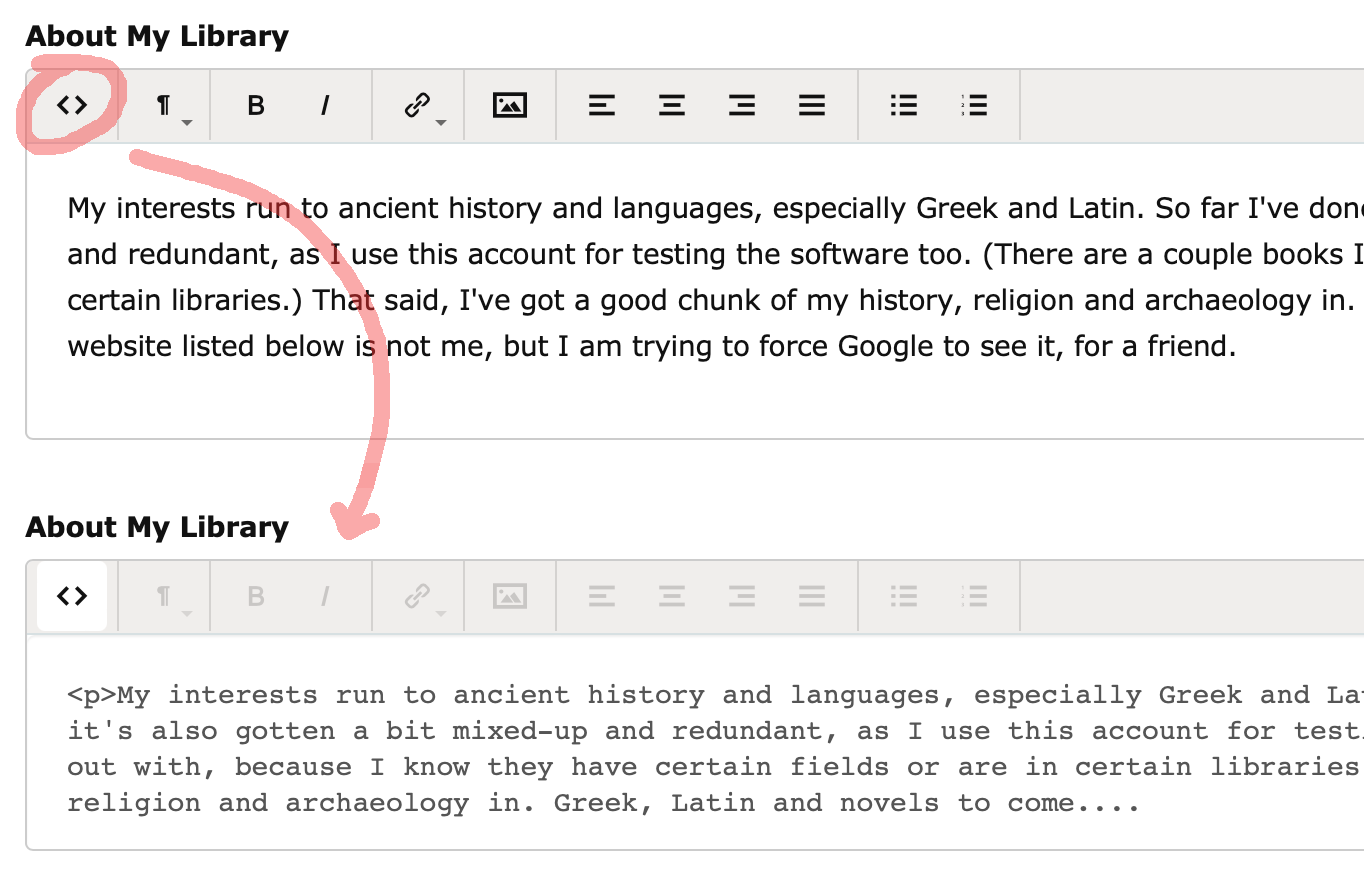
4. The text fields, like "About My Library" and "About Me" now use a simple WYSIWYG editor. So you can do easy stuff, like bold and insert images, without knowing HTML. But you can click to see and change the HTML directly. See illustration below.
You can check them out here: https://www.librarything.com/settings/profile
Some highlights:
1. Pages are LT2-ified and mobile ready.
2. Litsy linking is working again (on https://www.librarything.com/settings/sites)
3. Some reorganization/rationalization of the pages, order and wording
4. The text fields, like "About My Library" and "About Me" now use a simple WYSIWYG editor. So you can do easy stuff, like bold and insert images, without knowing HTML. But you can click to see and change the HTML directly. See illustration below.
3AnnieMod
It seems to be messing up the links in "About me" - or the last link anyway.
I have 3 links in the section. The first 2 survived a "save". The third one was lost and now points to the current page (and yes, it was working before I did re-save)
I have 3 links in the section. The first 2 survived a "save". The third one was lost and now points to the current page (and yes, it was working before I did re-save)
4lilithcat
>1 timspalding:
A) thanks for changing the way the "About Me" section looks - no longer spread out the full screen width1 Yay!
B) I do think it would be helpful if it were clearer how to see the toolbar. The first time I looked at Settings, I couldn't figure out where/how to edit, and it was only a random click that revealed the toolbar.
A) thanks for changing the way the "About Me" section looks - no longer spread out the full screen width1 Yay!
B) I do think it would be helpful if it were clearer how to see the toolbar. The first time I looked at Settings, I couldn't figure out where/how to edit, and it was only a random click that revealed the toolbar.
6conceptDawg
>4 lilithcat: You don't need the toolbar until you're editing.
I mean, you don't carry around the dashboard of your car when you're out shopping do you?
I mean, you don't carry around the dashboard of your car when you're out shopping do you?
7conceptDawg
I've added a quick "New Feature" box to the editor. You should only see it on the first textarea box on a page when you click on it.
8lilithcat
>6 conceptDawg:
Yes, I GET THAT! But when you DO need it, you need to know it's there and how to find it.
As I said, I found it completely by accident. That's not good.
Yes, I GET THAT! But when you DO need it, you need to know it's there and how to find it.
As I said, I found it completely by accident. That's not good.
9conceptDawg
Well, to continue the analogy, if you're sitting on a bicycle and the dashboard of your car pops up in front of you you'll probably notice. :)
But in all seriousness, we've added a "Look, new feature!" box for the first time you see one.
But in all seriousness, we've added a "Look, new feature!" box for the first time you see one.
10gwernin
Looks like a nice change - I wish it had been up last week when I was updating some of this stuff and trying to remember the html!
11Petroglyph
Looking good. Things are moving in the right direction!
12amarie
I edited my About My Library and now most of it has escaped beyond the confines of a parent container with the public view. It's currently a paragraph and then a bullet list. I used the editor but have checked the HTML as well.
13rodneyvc
>12 amarie: Indeed, so it has!
14gilroy
>12 amarie: And that would be why some of us are scared to touch our profile at all now
15AnnieMod
>14 gilroy: See >3 AnnieMod: above as well (which is getting ignored but that's fine). Mine did not have any structural html though - just links and bold/italics.
16birder4106
Once the problems mentioned above are solved, I think that will be a significant improvement.
I still have one wish (noble horse or pony): I would like to be able to create structured lists/tables.
Is there already a way (you can't use spaces), or will it be possible?
I still have one wish (noble horse or pony): I would like to be able to create structured lists/tables.
Is there already a way (you can't use spaces), or will it be possible?
17Maddz
>16 birder4106: Last 2 buttons on the right - unordered list and ordered list.
18amarie
Well, I am back within bounds by removing the unordered list.
I also noticed by testing that 1) headings are not recognized, 2) quotes also escape the parent container (and can't be undone without editing the HTML), 3) alignment is not recognized, 4) links are okay, 5) images are okay but are difficult to align (I know workarounds but would have to get into the code)
I also noticed by testing that 1) headings are not recognized, 2) quotes also escape the parent container (and can't be undone without editing the HTML), 3) alignment is not recognized, 4) links are okay, 5) images are okay but are difficult to align (I know workarounds but would have to get into the code)
19gilroy
An issue has cropped up:
https://www.librarything.com/topic/340282
https://www.librarything.com/topic/340282
20conceptDawg
>18 amarie:
1) Headings are getting stripped out by our backend code. We'll get that sorted.
2) This is because they now use the semantically correct (yay!) blockquote element which the profile page doesn't recognize. We'll get that fixed quickly.
3) Alignment is also getting stripped out by our backend code that "cleans" the text for "bad" stuff. We'll see about letting that through.
5) If you can give me some examples of how you're trying to align images we might be able to deal with that too.
Basically, we're trying to give more freedom to edit but we have to put some checks in or people could really destroy the formatting of the entire page. Those checks were put in years ago and the editor is trying to use some of that markup now, so we need to let them through (or take them out of the editor).
As for your post in >3 AnnieMod: above. I can't duplicate that but if you can then leave it in your profile and point me to it. I'll take a look.
1) Headings are getting stripped out by our backend code. We'll get that sorted.
2) This is because they now use the semantically correct (yay!) blockquote element which the profile page doesn't recognize. We'll get that fixed quickly.
3) Alignment is also getting stripped out by our backend code that "cleans" the text for "bad" stuff. We'll see about letting that through.
5) If you can give me some examples of how you're trying to align images we might be able to deal with that too.
Basically, we're trying to give more freedom to edit but we have to put some checks in or people could really destroy the formatting of the entire page. Those checks were put in years ago and the editor is trying to use some of that markup now, so we need to let them through (or take them out of the editor).
As for your post in >3 AnnieMod: above. I can't duplicate that but if you can then leave it in your profile and point me to it. I'll take a look.
21AnnieMod
>20 conceptDawg: I fixed it the next day. Not sure what was wrong with that link - maybe I had weird formatting (although I know it was a valid link as I tend to use it to get into the thread). Or a glitch. Or I clicked on something - it just lost its href completely even though it was still showing as a link. If noone else has the issue, it can be ignored I suspect.
22PawsforThought
The ”Media Settings” page doesn’t work for me on either phone or tablet. The page loads but I can’t scroll anywhere. Doesn’t happen on any other page.
23conceptDawg
>22 PawsforThought: Hm. Interesting. I'll check that out.
In the meantime, it looks like you can scroll with a two-finger drag.
In the meantime, it looks like you can scroll with a two-finger drag.
24conceptDawg
>22 PawsforThought: Fixed.
25conceptDawg
>20 conceptDawg: Blockquotes are now displaying correctly. I'll get to the headers (if we agree to allow them) and alignment tomorrow.
26amarie
>20 conceptDawg: No worries. I’ve dealt with other similar editors and/or intersections between different style sheets and just shared what I saw.
As for images, I generally try to follow what an editor provides me now, since as you said certain code has to be removed. I don’t really need images but I expect most people will want text to flow around them either in the right or left side.
As for images, I generally try to follow what an editor provides me now, since as you said certain code has to be removed. I don’t really need images but I expect most people will want text to flow around them either in the right or left side.
27birder4106
>17 Maddz:
Thanks, but that's not the kind of lists I envision.
I want lists like tables.
In writing programs they can be created with the help of tabulator characters.
Thanks, but that's not the kind of lists I envision.
I want lists like tables.
In writing programs they can be created with the help of tabulator characters.
28timspalding
We've pulled back the fancy editor momentarily, while we work on full tracking of all profile text, so members can see and revert to old text, if they want to.
T
T
29conceptDawg
The advanced editor has returned.
And this time....it brought friends.
Did you read that in the cool movie trailer voice? Gosh, I hope so.
But the editor has returned and we've added edit histories for your About My Library and About Me sections. You can click the "History" link and see previous saved states for each of these fields. And we've "autosaved" the text as it was when the feature went live. Hopefully this will help a lot of you that might recycle previous entries and just update them.
31lorax
Once again, my mental translation of "LT2ified/mobile-friendly" to "ginormous font, acres of whitespace, and massive decrease in visible content" is accurate. I dread the day they reach the catalog - at least this isn't something I look at every day.
The WISIWYG editor is nice, I'm sure. But it's not worth the other associated LT2 changes.
The WISIWYG editor is nice, I'm sure. But it's not worth the other associated LT2 changes.
32conceptDawg
>31 lorax: We get it.
33conceptDawg
I've fixed the display of Header text types if you use the advanced editor to include H1, H2, H3,etc in your text. They were getting thrown out to the left on the profile page. They are now shown correctly in line with the rest of your text.
We previously didn't allow those tags to be included in those text fields, so this is also a relaxing of that rule.
We previously didn't allow those tags to be included in those text fields, so this is also a relaxing of that rule.
34gwernin
How do I add favorite publishers to my profile page? I don't see them when I try to edit my profile.
35gilroy
>34 gwernin: I know you add favorite authors by going to their pages and clicking a button, but not sure about publishers.
36lilithcat
>34 gwernin:
I don't think you can. That's been a proposal: https://wiki.librarything.com/index.php/Favorite_publishers_(recommended_feature... but I don't think it was ever implemented.
I don't think you can. That's been a proposal: https://wiki.librarything.com/index.php/Favorite_publishers_(recommended_feature... but I don't think it was ever implemented.
37gwernin
Hmm. I have two publishers listed on my profile page, but I have no idea how they got there -- I possibly put them there 15 years or more ago, when I was first setting things up. Maybe it was a feature then and isn't now?
38MarthaJeanne
>37 gwernin: Those links seem to be related to ER, and not general publisher pages.
39gwernin
>38 MarthaJeanne: I wouldn't have thought either of those was something I got from ER. Oh well.
40lilithcat
>38 MarthaJeanne:
It's because those publishers have author pages, so @gwernin probably favorited them from those.
Osprey Publishing
Shire Publications
It's because those publishers have author pages, so @gwernin probably favorited them from those.
Osprey Publishing
Shire Publications
41gwernin
>40 lilithcat: thanks, that makes more sense.
42anglemark
>40 lilithcat: 1. @gwernin is not listed on their author pages as having favorited them.
2. They do not appear on @gwernin's profile page as favorite authors but as favorite publishers.
2. They do not appear on @gwernin's profile page as favorite authors but as favorite publishers.
43kristilabrie
>37 gwernin: Have those two publishers always been there, or are you just now seeing them pop up on your profile page? (Say, after the new Early Reviewers program was released last month?)
44JBD1
I'm pretty sure (and this goes waaaaay back to the original launch of publisher pages so I may be misremembering things), that you could "favorite" publisher pages from there (I see I have a few on my profile too). It looks like that went away at some point?
45kristilabrie
>44 JBD1: Yes, thanks! @timspalding just verified for me this is a remnant of the publishers system.
>37 gwernin: We'll discuss how to handle and post an update.
If anyone has preferences, feel free to share.
>37 gwernin: We'll discuss how to handle and post an update.
If anyone has preferences, feel free to share.
46norabelle414
I don't really care about having favorite publishers on my profile, but being able to filter the LTER list by favorite publishers is DEFINITELY a feature I would use
47kristilabrie
We're going to remove Favorite Publishers from profile pages for now, thanks!
48gwernin
>45 kristilabrie: As >44 JBD1: says, they've been there quite a while. (I'm a 17-year member.) They aren't publishers I would favorite nowadays.
ETA >47 kristilabrie: good!
ETA >47 kristilabrie: good!
49paradoxosalpha
The list of publishers available to select as "favorites" was always painfully short and missing my actual favorite publishers, so I don't mind seeing this old feature vanish.
50timspalding
>49 paradoxosalpha:
I'd like to bring it back, but it should be based on publishers as present in the book data, not those who created publisher accounts on LT—mostly ER publishers.
I'd like to bring it back, but it should be based on publishers as present in the book data, not those who created publisher accounts on LT—mostly ER publishers.
51paradoxosalpha
>50 timspalding:
That would be lovely. Of course, there's no publisher field as such right now, is there?
That would be lovely. Of course, there's no publisher field as such right now, is there?
52the_red_shoes
>1 timspalding: "Friend Finder" on Twitter still doesn't work:
Invite friends to LibraryThing (0)
There was an error retrieving your friends list from Twitter. Please try again shortly.
Invite friends to LibraryThing (0)
There was an error retrieving your friends list from Twitter. Please try again shortly.
53conceptDawg
>52 the_red_shoes: It's certainly working for my twitter account. Maybe unlink your account and link it again? If it still won't connect then we'll have to dig deeper into the cause.
54timspalding
Yes, linking and unlinking should do it.
55the_red_shoes
>53 conceptDawg: I don't see the option to do that here?
https://www.librarything.com/settings/friendfinder
https://www.librarything.com/settings/friendfinder
56the_red_shoes
>54 timspalding: Where do I do that? It's not on the Friend Finder settings page.
https://www.librarything.com/settings/friendfinder
I should mention I've linked and unlinked this many times over the years. It has never worked.
https://www.librarything.com/settings/friendfinder
I should mention I've linked and unlinked this many times over the years. It has never worked.
58the_red_shoes
>57 knerd.knitter: OK, for some reason the button "Unlink Twitter" was not visible on that page last time I checked. It worked this time, thanks!
59John5918
I've just noticed on my profile page and on one or two other people's profile pages a message that says, "All new profile comments are now private". When did this happen? Is there a reason for it? Is there no longer an option to make your comments either public or private? Or have I just missed something?
62lauralkeet
I just discovered the new editor today when I updated my profile page. I like it, but after I added something to my page and saved, one section (that I had not modified) was not displaying correctly. I edited again in an attempt to fix it, but no luck.
The "about my library" section includes a heading, "My Rating System" followed by the LT stars and a short "definition" of each. These now display on the far left side of the page instead of being indented under the heading.
I took a look at the HTML and it all looks normal to me, but I don't know enough to fix this indentation issue. Suggestions?
The "about my library" section includes a heading, "My Rating System" followed by the LT stars and a short "definition" of each. These now display on the far left side of the page instead of being indented under the heading.
I took a look at the HTML and it all looks normal to me, but I don't know enough to fix this indentation issue. Suggestions?
63norabelle414
>62 lauralkeet: Probably the same as this issue: https://www.librarything.com/topic/340897
65lauralkeet
>63 norabelle414: that's very helpful, thank you!
66conceptDawg
>62 lauralkeet: and >63 norabelle414: Yep. And it will be fixed very soon with the release of an updated Profile page.
67the_red_shoes
>59 John5918: Hunh, well that's a giant surprise.
69AnnieMod
>68 gwernin: Just add books to your Currently Reading collection - that’s how that module is filled in.
70gwernin
>69 AnnieMod: thanks. I managed to do it a couple of months ago and then forgot how it's done! Not something I normally use.

