1timspalding
See here
When you post a bug, be sure to let us know what you're using to see it--Desktop? Mobile? What device? What browser?
Thanks!
When you post a bug, be sure to let us know what you're using to see it--Desktop? Mobile? What device? What browser?
Thanks!
2Foretopman
When I go to More, Helpers, Helpers Actions, I get just "Error". Desktop(Win10), Vivaldi 3.3
(Also on the More page: Book Haiku and Sign up for SOTT give the same "Error" message)
(Also on the More page: Book Haiku and Sign up for SOTT give the same "Error" message)
3kristilabrie
I'm seeing some weird inconsistencies with purple (viewed) links on my iPhone 8—showing as purple where I didn't view them yet—in an incognito browser. Lower on the totem pole and might be an edge case, but worth looking into if others see the same.
Testing: >98 NinieB:
Testing: >98 NinieB:
4JBD1
What's up with the capital A in the serif face? Is it missing the crossbar for everyone? Just me?
http://www.librarything.com/pic/7799973
Chrome 84.0.4147.135 (Mac desktop)
Ah - the crossbar is there in Chrome on Windows 10, weirdly ...
http://www.librarything.com/pic/7799973
Chrome 84.0.4147.135 (Mac desktop)
Ah - the crossbar is there in Chrome on Windows 10, weirdly ...
5kristilabrie
>4 JBD1: Very weird. I see the crossbar in Chrome on my Macbook Pro. Chrome 85
6JBD1
>5 kristilabrie: - Huh! Bizarre!
ETA: If I zoom WAAAAY in, it starts to look like a gray line where the crossbar should be ...
ETA: If I zoom WAAAAY in, it starts to look like a gray line where the crossbar should be ...
8Taphophile13
>4 JBD1: Odd. I'm not seeing the crossbar with W10 & Chrome.
9kristilabrie
>8 Taphophile13: What version of Chrome do you have?
10Taphophile13
>9 kristilabrie: 85.0.4183.102
11kristilabrie
>10 Taphophile13: Strange. Maybe something with retina/non-retina screens?
12Foretopman
>7 kristilabrie: On the More page, I click on "Games and Community Projects". Then I scroll to "Helpers". There are three links there, in order "Helpers Actions", "Helpers Statistics", "Helpers Log". The first of those three links does not work for me.
13kristilabrie
>12 Foretopman: Okay, thanks! That link might need to get dropped. I'll look at it.
14Taphophile13
>11 kristilabrie: Had to google retina/non-retina screen. Apparently it's only Macs?
I'm using Windows desktop.
I'm using Windows desktop.
15kristilabrie
>14 Taphophile13: @conceptDawg agrees it's definitely some type of rendering bug, which we don't have direct control over but we might be able to tweak to make sure it's seen on all screens.
16conceptDawg
>14 Taphophile13: Retina is a Mac-only name for it, but the concept exists across all computers. It's basically Apple's fancy codeword for HD screen resolutions.
17Taphophile13
>16 conceptDawg: Ah, thanks for the info. I can't keep up with the technology.
18conceptDawg
>12 Foretopman: Fixed. Removed erroneous link.
19DuncanHill
Mobile view. Zeitgeist page. Not at all obvious where the books/members/popularity/etc links have been hidden. That said, I'll probably continue to force the desktop view on my mobile as I do with almost all websites.
20anglemark
Zeitgeist page: The "Translate" link in the top bar doesn't work for me (latest Firefox on latest Mac OS).
21kristilabrie
>19 DuncanHill: If you're not sure where to find the menu, tap the "Overview" drop-down menu with the carrot-icon that points downward, just below the site search box on Zeitgeist. That will give you all the sub-pages on Zeitgeist, with the hamburger menu next to site search for the main LT pages/sections.
22kristilabrie
>20 anglemark: I think I saw the developers on that one as a known issue, thanks.
23jjwilson61
>21 kristilabrie: Caret, not carrot.
24DuncanHill
>21 kristilabrie: As I said, it's not at all obvious.
25shadrach_anki
I am not sure if this was introduced with the new page designs or with the new series system (and I just didn't notice it before), but none of the series pages are showing the page name in the browser tab (desktop, Windows 7, Chrome).
As an example, the tab for this talk thread shows the following text: LibraryThing "2.0," First Pages - BUGS | New features | LibraryThing but any series page I open has | LibraryThing as the only text.
As an example, the tab for this talk thread shows the following text: LibraryThing "2.0," First Pages - BUGS | New features | LibraryThing but any series page I open has | LibraryThing as the only text.
27timspalding
>26 Collectorator: Nothing to do with this.
28aspirit
The Help link (moved to the bottom of the page) goes to an error page: "Bad title
"The requested page title is empty or contains only the name of a namespace."
"The requested page title is empty or contains only the name of a namespace."
29Petroglyph
On a desktop, win10, latest version of Firefox.
- Under Zeitgeist > Books > Most-reviewed books: The top option, The hitch-hiker's guide to the galaxy is an image link, unlike all the other books in that list, and the image is a broken jpeg icon
- The various rankings under Zeitgeist > Popularity are useless: all lists are dominated by the Harry Potter books and The Hobbit etc -- books that top the all-time lists. Could those books be ignored? I'd rather see month-specific trends (and year-specific etc), instead of how the all-time top ten is doing each month (year, etc)
- On the "More" page, I feel that import/export is too far down.
- Any of the new series pages I open fails to load the page title in the browser tab: all that appears is "| LibraryThing"
30Petroglyph
Under Zeitgeist > Common Knowlegde: the columns are misaligned:


31lorax
The crossbar on the A is definitely screen-specific. I can't reproduce getting it to vanish entirely, but it is very very thin if viewed on my external Mac monitor, and more clearly present on the laptop screen. The laptop is the Last Great Laptop (2015 15" Macbook Pro), the external is "Cinema HD Display". In general the external looks more pixellated.
32konallis
This might not be peculiar to the new design, but on my phone browser (Opera Mini for BlackBerry), the following displays at the bottom of the Zeitgeist page:
'Just adding some crap here so that there is content in the help drawer. Soon there will be help. But I offer no help at this point. Only disappointment.'
This text is obviously meant to be hidden with CSS, but my phone doesn't render a lot of the styling. I assume someone on a screen reader would get this text too, which isn't desirable given one of the aims of the redesign is better accessibility.
'Just adding some crap here so that there is content in the help drawer. Soon there will be help. But I offer no help at this point. Only disappointment.'
This text is obviously meant to be hidden with CSS, but my phone doesn't render a lot of the styling. I assume someone on a screen reader would get this text too, which isn't desirable given one of the aims of the redesign is better accessibility.
33lilithcat
I'm not seeing the crossbar, either.
Mac OS Sierra 10.12.6, Firefox 80.0.1 or Safari 12.1.2
Mac OS Sierra 10.12.6, Firefox 80.0.1 or Safari 12.1.2
34conceptDawg
>20 anglemark: Translate link is fixed.
35rosalita
Has it been a while since Zeitgeist was updated? I checked a random badge (cover uploading) and while the gold badge on my profile page says I've uploaded 666 (yikes) the user with the most in Zeitgeist has 402 but looking at that user's profile page it lists 730). I don't even appear in the list, which ends at 3 with a comma that seems to indicate there should be more but isn't.
To be clear, I'm looking at this page: https://www.librarything.com/zeitgeist/helpers
To be clear, I'm looking at this page: https://www.librarything.com/zeitgeist/helpers
36conceptDawg
>32 konallis: Hah. That's actually just content that I wrote to myself...you know, so I wouldn't forget it. Good thing I didn't forget about it.
Fixed.
Fixed.
37conceptDawg
>31 lorax: I haven't seen it on any of my screens (5k external, laptop screen, and old-school 1x external) but it's certainly problematic. My guess is that people connecting via older VGA connectors and HDMI adapters might see the problem.
And it's not like we're using some obscure font. It's Google's "Playfair Display," which is THE poster child for modern OpenType Variable Fonts. I'm guessing thousands—if not hundreds of thousands—of sites use it. But I'm investigating to see if I can fix the problem without having to revert to a different font. I do like the way it works with the overall design.
And it's not like we're using some obscure font. It's Google's "Playfair Display," which is THE poster child for modern OpenType Variable Fonts. I'm guessing thousands—if not hundreds of thousands—of sites use it. But I'm investigating to see if I can fix the problem without having to revert to a different font. I do like the way it works with the overall design.
38konallis
>36 conceptDawg: Excellent :)
39conceptDawg
>28 aspirit: Help link in footer is now fixed and goes to HelpThing on the wiki.
I have better plans for Help (as surfaced by the other "crap" bug mentioned above) but we aren't quite ready to roll that out today. Soon.
I have better plans for Help (as surfaced by the other "crap" bug mentioned above) but we aren't quite ready to roll that out today. Soon.
40parlerodermime
So, I was working on the Little House novels, chronological order series this morning, and now going back to it, there are some issues that seem related to the site update. I'm on a Windows laptop using Google Chrome.
1. The books have a custom order rather than the order relying on the order label, but it's no longer possible to drag and drop the books to change the order.
2. The sorting groups (by drag and drop) function also appears to be nonfunctional (and was working 5 hours ago).
1. The books have a custom order rather than the order relying on the order label, but it's no longer possible to drag and drop the books to change the order.
2. The sorting groups (by drag and drop) function also appears to be nonfunctional (and was working 5 hours ago).
41aspirit
>39 conceptDawg: thanks. And (hahaha) I like the glimpse into the notes you leave yourself.
42lemontwist
>35 rosalita: Same. I should be on some of the top helpers on Zeitgeist and don't see my username listed.
43timspalding
More > Helpers is now fixed. See https://www.librarything.com/more/helpers
But I think we should move this page to the Wiki. I'll open a topic about it in the Combiners! group.
>1 timspalding: This is a tested backreference.
But I think we should move this page to the Wiki. I'll open a topic about it in the Combiners! group.
>1 timspalding: This is a tested backreference.
44timspalding
Zeitgeist page: The "Translate" link in the top bar doesn't work for me (latest Firefox on latest Mac OS).
Huh. I'm not seeing a problem at all. Can you give me the exact URL. Maybe there's a problem with just your language? Not sure what language you use.
I did fix the link for "See the Zeitgeist for your language alone" or whatever it is in your language.
Huh. I'm not seeing a problem at all. Can you give me the exact URL. Maybe there's a problem with just your language? Not sure what language you use.
I did fix the link for "See the Zeitgeist for your language alone" or whatever it is in your language.
45timspalding
Caret, not carrot
It is pointy. Therefore, a carrot!
It is pointy. Therefore, a carrot!
46timspalding
The Help link (moved to the bottom of the page) goes to an error page: "Bad title
"The requested page title is empty or contains only the name of a namespace."
Can you link to the page this is happening on?
"The requested page title is empty or contains only the name of a namespace."
Can you link to the page this is happening on?
47timspalding
The various rankings under Zeitgeist > Popularity are useless: all lists are dominated by the Harry Potter books and The Hobbit etc -- books that top the all-time lists. Could those books be ignored? I'd rather see month-specific trends (and year-specific etc), instead of how the all-time top ten is doing each month (year, etc)
No, it's a popularity list. We give a LONG popularity list so you can see more books. The fact is that it's not the dead weight of the past that keeps them up--they're that popular every month.
The "Hot this month" feature is more of what you want. It's about velocity and change, not popularity. We might look at trying to show that for past months.
On the "More" page, I feel that import/export is too far down.
Yeah. It's a balance. It's on the Add Books page too. But I'll think about it.
Under Zeitgeist > Books > Most-reviewed books: The top option, The hitch-hiker's guide to the galaxy is an image link, unlike all the other books in that list, and the image is a broken jpeg icon
Checking.
No, it's a popularity list. We give a LONG popularity list so you can see more books. The fact is that it's not the dead weight of the past that keeps them up--they're that popular every month.
The "Hot this month" feature is more of what you want. It's about velocity and change, not popularity. We might look at trying to show that for past months.
On the "More" page, I feel that import/export is too far down.
Yeah. It's a balance. It's on the Add Books page too. But I'll think about it.
Under Zeitgeist > Books > Most-reviewed books: The top option, The hitch-hiker's guide to the galaxy is an image link, unlike all the other books in that list, and the image is a broken jpeg icon
Checking.
48timspalding
'Just adding some crap here so that there is content in the help drawer. Soon there will be help. But I offer no help at this point. Only disappointment.'
Damn it. Our secret is out.
Damn it. Our secret is out.
49timspalding
Has it been a while since Zeitgeist was updated? I checked a random badge (cover uploading) and while the gold badge on my profile page says I've uploaded 666 (yikes) the user with the most in Zeitgeist has 402 but looking at that user's profile page it lists 730). I don't even appear in the list, which ends at 3 with a comma that seems to indicate there should be more but isn't.
Ah. So the distinction here is "Last seven days" vs. "All time." There's a switcher thigy there that toggles between the two. I just refreshed it completely and the numbers barely budged, because it's counting only uploads in the last seven days. If you go to the "All time" list you can see more users, but as it only lists the first 1,000, you are not apparently on it.
Ah. So the distinction here is "Last seven days" vs. "All time." There's a switcher thigy there that toggles between the two. I just refreshed it completely and the numbers barely budged, because it's counting only uploads in the last seven days. If you go to the "All time" list you can see more users, but as it only lists the first 1,000, you are not apparently on it.
51timspalding
And it's not like we're using some obscure font. It's Google's "Playfair Display," which is THE poster child for modern OpenType Variable Fonts. I'm guessing thousands—if not hundreds of thousands—of sites use it. But I'm investigating to see if I can fix the problem without having to revert to a different font. I do like the way it works with the overall design.
I've seen situations before where we do something everyone does, but problems crop up. I suspect this commonly happens because most of the sites using such a thing don't have the sort of users we do, or the sort of user communication. In other words, if Google made a bad font, how would we know. Who'd be reporting the lack of an A crossbar on some ecommerce site, or whatever?
I've seen situations before where we do something everyone does, but problems crop up. I suspect this commonly happens because most of the sites using such a thing don't have the sort of users we do, or the sort of user communication. In other words, if Google made a bad font, how would we know. Who'd be reporting the lack of an A crossbar on some ecommerce site, or whatever?
52amanda4242
>45 timspalding: Are you sure it's not a parsnip? The color seems a little off. ;)
53lilithcat
>43 timspalding:
Oh, no, this is bad.
I use the Helpers Log/Author Combination a lot, and now I cannot see anywhere near as much on a screen as I used to.
Oh, no, this is bad.
I use the Helpers Log/Author Combination a lot, and now I cannot see anywhere near as much on a screen as I used to.
54timspalding
>53 lilithcat:
To be clear, the problem is with which pages? Is it this one?
https://www.librarything.com/log_helpers.php
To be clear, the problem is with which pages? Is it this one?
https://www.librarything.com/log_helpers.php
55gabriel
Perhaps this is by design, but once you're in common knowledge via Zeitgeist, you can't access the other Zeitgeist side menu options.
56scott_beeler
>40 parlerodermime: I'm seeing the same thing as parlerodermime, also working in Chrome on Windows. Custom-order series page, can't drag-and-drop works to change order.
57lilithcat
>54 timspalding:
Yes, that one, too, but primarily this one: https://www.librarything.com/log_helpers.php?view=authors
Yes, that one, too, but primarily this one: https://www.librarything.com/log_helpers.php?view=authors
58rosalita
>49 timspalding: Thanks for the explanation. I didn't even see the toggle button to switch timeframes, so shame on me. And I don't care about being listed at all; it was just the easiest thing for me to check. :-)
59conceptDawg
>55 gabriel: That is by design, as the Common Knowledge link is actually a link out to a different section on the site. And this is as it's always been.
60NOLAjazzmuseum
Desktop, Google Chrome
Get an error message instead of confirmation after trying to import .csv files with universal import.
https://www.librarything.com/more/importquestionsconfirmed
Get an error message instead of confirmation after trying to import .csv files with universal import.
https://www.librarything.com/more/importquestionsconfirmed
61conceptDawg
>60 NOLAjazzmuseum: Fixed. Thank you.
62antqueen
In the narrow view on the series page (on a phone, for example, or if I squish my laptop browser window) I don't get the grey checkboxes. The green ones are there, though. Not sure about other colors. I do get the grey checks on the wide view. I'm looking at the Vorkosigan series, if it matters.
63JMK2020
Is it the good place for these 3 points ?
No question of design but it's new
New design and ergonomy are a really good job. Tx
Desktop, Chrome Version 85.0.4183.102 (64b). Windows 8.1
1) It seems there is a pb to add or change http links on author page (modification or deletion impossible the icon is missing)
Ex : https://www.librarything.fr/author/mardongrgory&norefer=2
2) it seems there is a pb with some CK fields that need to be deleted
Ex : https://www.librarything.fr/author/mardongreacutegory
==> https://www.librarything.fr/author/mardongreacutegory/issues
-->> Combinaison pb : Can't delete date of birth and sexe (english page vs french page)
3) problem to find an specific editorial collection for and from a concerned book. The collection does not appear - after search - in the suggestions
Serie editor is "Fayard, Biographies littéraires"
Is it an accent or ponctuation pb ?
Suggestion are :
Emile Zola, Biographies littéraires, Fayard (Henri Mitterand)
Victor Hugo, Biographies littéraires, Fayard (Jean-Marc Hovasse)
However serie editor is here :
https://www.librarything.fr/nseries/313599/Fayard-Biographies-litt%C3%A9raires
Tx,
No question of design but it's new
New design and ergonomy are a really good job. Tx
Desktop, Chrome Version 85.0.4183.102 (64b). Windows 8.1
1) It seems there is a pb to add or change http links on author page (modification or deletion impossible the icon is missing)
Ex : https://www.librarything.fr/author/mardongrgory&norefer=2
2) it seems there is a pb with some CK fields that need to be deleted
Ex : https://www.librarything.fr/author/mardongreacutegory
==> https://www.librarything.fr/author/mardongreacutegory/issues
-->> Combinaison pb : Can't delete date of birth and sexe (english page vs french page)
3) problem to find an specific editorial collection for and from a concerned book. The collection does not appear - after search - in the suggestions
Serie editor is "Fayard, Biographies littéraires"
Is it an accent or ponctuation pb ?
Suggestion are :
Emile Zola, Biographies littéraires, Fayard (Henri Mitterand)
Victor Hugo, Biographies littéraires, Fayard (Jean-Marc Hovasse)
However serie editor is here :
https://www.librarything.fr/nseries/313599/Fayard-Biographies-litt%C3%A9raires
Tx,
64villemezbrown
Seconded. Cannot drag and drop items on "Add to/Organize Series" page. I'm using Google Chrome on Apple desktop.
65FAMeulstee
>64 villemezbrown: Same here, using Google Chrome on a HP laptop.
66conceptDawg
>64 villemezbrown:, et al. Drag and drop on series
Should be fixed.
Should be fixed.
67elenchus
>47 timspalding: Under Zeitgeist > Books > Most-reviewed books: The top option, The hitch-hiker's guide to the galaxy is an image link, unlike all the other books in that list, and the image is a broken jpeg icon
Checking.
And now the thumbnail rotates through various other low-res covers, with each refresh. Clicking on it takes me to the work page, usually featuring a different cover image.
Is it really the first entry, or just an unrelated image? Why would the top entry in that list change so frequently, and are any of those titles likely to be more reviewed than Hunger Games?
Checking.
And now the thumbnail rotates through various other low-res covers, with each refresh. Clicking on it takes me to the work page, usually featuring a different cover image.
Is it really the first entry, or just an unrelated image? Why would the top entry in that list change so frequently, and are any of those titles likely to be more reviewed than Hunger Games?
68conceptDawg
I removed those images. They were strange in that they were random images from within the block and most people didn't catch on to that. And they needed some updating to remove errors. So easier to remove them for now and we'll circle back around later.
69FAMeulstee
>66 conceptDawg: Thank you!
70norabelle414
When viewing a series page in the smallest width (e.g. mobile-portrait, or if I size my laptop browser very small), the gray checkmarks do not show up next to items on the list. Once the screen is large enough to show each book on a single line, the gray checkmarks do show up. This only happens with the gray check marks, not blue or green.
71conceptDawg
>70 norabelle414:. Interesting. I'll look into that.
72parlerodermime
>66 conceptDawg:, thank you!! Drag and drop on series is working again for me.
73bergs47
I don't know if this is a bug but I don't think you have updated any of the Helpers figures in the last 2 days for last Seven Days. I keep track of mine and they have not changed since Monday
74conceptDawg
>73 bergs47: Not a bug, per se. But thanks, we'll check. Likely that process was paused for some reason or another related to systems issues and then not restarted. It happens.
75timspalding
>73 bergs47:
I don't believe that process was paused. But it's a complex process, with a cache and a reprocessing queue. (It's not just cached for X and then recalculated on the fly.) Each section of the page is separately cached and separately queued. I need to get a sense of the real flow of it. I'm saving the page each day, starting today, so I track it.
I don't believe that process was paused. But it's a complex process, with a cache and a reprocessing queue. (It's not just cached for X and then recalculated on the fly.) Each section of the page is separately cached and separately queued. I need to get a sense of the real flow of it. I'm saving the page each day, starting today, so I track it.
77timspalding
>73 bergs47:
Okay, I fixed something in how LibraryThing handled these caches. Let me know what you think. Mind you, it will not update everything all the time. But if you see things that are many days out of date, it may be a problem I can detect and solve.
Okay, I fixed something in how LibraryThing handled these caches. Let me know what you think. Mind you, it will not update everything all the time. But if you see things that are many days out of date, it may be a problem I can detect and solve.
78bergs47
Work combiners Author combiners Common Knowledge Distinct author Edition separators Work Author Edits Series
Week Alltime Week Alltime Week Alltime Week Alltime Week Alltime Week Alltime Week Alltime
14/09/2020 54 18057 10 2942 398 72422 18 4456 6 6217 5 1030 0 70
17/09/200 43 18081 8 2945 298 72523 22 4468 4 6221 14 1036 0 70
So it looks like its working
Pardon the layout?
Week Alltime Week Alltime Week Alltime Week Alltime Week Alltime Week Alltime Week Alltime
14/09/2020 54 18057 10 2942 398 72422 18 4456 6 6217 5 1030 0 70
17/09/200 43 18081 8 2945 298 72523 22 4468 4 6221 14 1036 0 70
So it looks like its working
Pardon the layout?
80NOLAjazzmuseum
Desktop, Google Chrome.
Getting error message when I try universal upload of a .csv file. It's taking longer than usual to upload and then instead of taking me to the next import settings page I just get an error message.
https://www.librarything.com/more/importsubmitconfirmed
Getting error message when I try universal upload of a .csv file. It's taking longer than usual to upload and then instead of taking me to the next import settings page I just get an error message.
https://www.librarything.com/more/importsubmitconfirmed
81aspirit
LibraryThing "2.0," First Pages #121: The menus open again.
In the LT 2.0 series pages, I'm currently having trouble adding groups for works or adding/editing links.
The Groups option is grayed out and cannot be selected.
When adding or editing a series external link, the popup box doesn't indicate anything has change. I'm not sure this is a bug instead of a design oversight, but what happens is that every time the change is submitted, it can't be seen on the series page without a screen refresh. But there's also no checkmark or note to indicate that hitting the "Submit" button did anything.
Tech: Android mobile device with Chrome-based browser (desktop view)
In the LT 2.0 series pages, I'm currently having trouble adding groups for works or adding/editing links.
The Groups option is grayed out and cannot be selected.
When adding or editing a series external link, the popup box doesn't indicate anything has change. I'm not sure this is a bug instead of a design oversight, but what happens is that every time the change is submitted, it can't be seen on the series page without a screen refresh. But there's also no checkmark or note to indicate that hitting the "Submit" button did anything.
Tech: Android mobile device with Chrome-based browser (desktop view)
82kristilabrie
>80 NOLAjazzmuseum: What is the page you're on before you reach the /more/importsubmitconfirmed page? To my knowledge you shouldn't be seeing that page but https://www.librarything.com/more/importquestionsconfirmed.
83NOLAjazzmuseum
>82 kristilabrie: https://www.librarything.com/import
I attempt to import the file as I normally would when I hit upload I get the error message.
I attempt to import the file as I normally would when I hit upload I get the error message.
85gabriel
The right-hand column in the series pages lacks spacing- everything is jammed up against the left margin, and there's some lines trailing into the main area of the page.
I'm using Chrome on a Macbook.
I'm using Chrome on a Macbook.
86goobergunch
I can't get drag-and-drop to work so as to reorder works in a Publisher Series, using Firefox 80 on Windows.
87amanda4242
>86 goobergunch: Which series? Drag and drop may be disabled depending on its default order.
88goobergunch
>87 amanda4242: DAW Book Collectors. I originally added 1858 before 1857, and couldn't fix the order without deleting 1858 and re-adding it at the bottom.
89amanda4242
>88 goobergunch: It's because it has so many works in it. The basic information page says that custom order is disabled for series over a thousand items, and I believe that's the only sort order which allows for drag and drop. I've set it to sort by label, but doing that's causing #100 and #1055 to fall between #1 and #2, so it looks like there's a bug there.
DAW Book Collectors
DAW Book Collectors
90timspalding
>89 amanda4242: Which series has the problem?
91amanda4242
>90 timspalding: https://www.librarything.com/nseries/256533/DAW-Book-Collectors
Also, all of the options that come up when I try to touchstone are for deleted series. Can deleted series please be removed from the list? Or at least say they're deleted?
Also, all of the options that come up when I try to touchstone are for deleted series. Can deleted series please be removed from the list? Or at least say they're deleted?
92wandering_star
Anything that was italicised in my previous posts, is no longer italicised - the words are there but not in italics.
93timspalding
>92 wandering_star: Can you give us an example. I'm seeing italics. For example, this is italic.
94lorax

I hadn't noticed that, largely because there's so much else about the new format that looks wrong that I hadn't noticed, but yeah. No italics.
Testing:
This should be italic
This should be bold
This should be underlined
For me, bold and underline appear correctly, italic does not.
96lorax
timspalding (#95):
Chrome and Firefox on a Mac both fail to show italics. Chrome on a Samsung tablet shows them correctly.
Chrome and Firefox on a Mac both fail to show italics. Chrome on a Samsung tablet shows them correctly.
97LadyoftheLodge
Using FireFox on my Dell laptop, Page Preview does not show the preview when posting a new message on a thread.
98NinieB
1. On a conversation page, when all the messages are read, the *jump to first unread* link is wonky. It takes me to a random spot amidst the read messages, rather than the bottom of the page. Didn't this link previously turn into *jump to bottom* or something like that, when there were no unreads?
2. When I use ># to refer to a previous post, it doesn't display correctly (no link or user name) when I return to the page. It does show up when I first save the post. Other posts by other people consistently show the link and user name.
I'm using Firefox 81.0.2 (64-bit) on a PC.
ETA: Corrected browser information.
1. I'm seeing the *jump to bottom* link now on other conversations and I'm wondering if it was a glitch?
2. I'm seeing this problem in only one post: https://www.librarything.com/topic/325375#7287547
2. When I use ># to refer to a previous post, it doesn't display correctly (no link or user name) when I return to the page. It does show up when I first save the post. Other posts by other people consistently show the link and user name.
I'm using Firefox 81.0.2 (64-bit) on a PC.
ETA: Corrected browser information.
1. I'm seeing the *jump to bottom* link now on other conversations and I'm wondering if it was a glitch?
2. I'm seeing this problem in only one post: https://www.librarything.com/topic/325375#7287547
99lilithcat
>93 timspalding:
I do not see the italics in your post.
I'm on a Mac, OS Sierra 10.12.6 with Firefox 81.0.2
However, on Safari 12.1.2, I do see the italics.
I do not see the italics in your post.
I'm on a Mac, OS Sierra 10.12.6 with Firefox 81.0.2
However, on Safari 12.1.2, I do see the italics.
100Diabolical_DrZ
I see italics, safari on ipad
102AndreasJ
I see the italics fine. Firefox 81.0.2, Windows.
Speaking of formating, the text I'm typing in the "Add a message" box is significantly larger than that in the posts above, which looks weird.
Also, the preview doesn't seem to work.
Speaking of formating, the text I'm typing in the "Add a message" box is significantly larger than that in the posts above, which looks weird.
Also, the preview doesn't seem to work.
103jjmcgaffey
Comments: I like the spacing in Talk a lot better on the phone and it's not bad on my computer (Android 10 Moto G Power/Firefox, and Windows 10 15.6"/Firefox respectively, latest versions of all).
However, I mostly use the Talk pane on the Home page and that's not as good now. Specifically, the only indicator that a topic has unread messages is a tiny, unbolded # new/# instead of the tiny, unbolded # under Unread Messages.
I really don't like the blue highlight on the "you've read all of these" messages in Talk - but I like less that there's nothing on the Home page module. I'd rather have the blue highlight, or bolding, or even both, on threads with unread posts (this is the one that catches the eye).
I agree strongly that the distinction between the header of a read and an unread message is WAY too faint now. The same color a few shades darker would work better. This applies more to the laptop, though it's annoying on the phone too.
I don't like the single link - 99% of the time, I click on the Unread Messages number to jump to the latest messages. Which means that with the whole topic line being a single link, I will be clicking twice that 99% of the time - really annoying.
I have used message sorting sometimes; it's not something I use a huge lot, though, so it doesn't specifically bother me that it's gone. As a substitute for the header sorting (which, yeah, caused problems regularly), would it be possible to put a Sort by... in the left-hand nav that opens a pane to choose what you sort by (like the Sort button in Your Books)? Then those who use it regularly would have it, but it would be very unlikely for someone to do it by accident. And maybe the same thing under Edit in the home page module.
Highlighting is pale but visible, on both laptop and phone. Doesn't bother me much.
Overall, I do feel LT got a lot paler (lower contrast) than it was yesterday. The very dark top menu (which hasn't changed yet) emphasizes this.
And why the heck is the font in here (writing a Talk post) bolded? It's a different font from Talk, which...isn't horrible - but it's bold, which makes it look...cramped? Makes it look like I'm yelling? Something. Do not like.
I see italics in >93 timspalding: and >94 lorax: (and bold and underlined) both on the computer and on the phone.
However, I mostly use the Talk pane on the Home page and that's not as good now. Specifically, the only indicator that a topic has unread messages is a tiny, unbolded # new/# instead of the tiny, unbolded # under Unread Messages.
I really don't like the blue highlight on the "you've read all of these" messages in Talk - but I like less that there's nothing on the Home page module. I'd rather have the blue highlight, or bolding, or even both, on threads with unread posts (this is the one that catches the eye).
I agree strongly that the distinction between the header of a read and an unread message is WAY too faint now. The same color a few shades darker would work better. This applies more to the laptop, though it's annoying on the phone too.
I don't like the single link - 99% of the time, I click on the Unread Messages number to jump to the latest messages. Which means that with the whole topic line being a single link, I will be clicking twice that 99% of the time - really annoying.
I have used message sorting sometimes; it's not something I use a huge lot, though, so it doesn't specifically bother me that it's gone. As a substitute for the header sorting (which, yeah, caused problems regularly), would it be possible to put a Sort by... in the left-hand nav that opens a pane to choose what you sort by (like the Sort button in Your Books)? Then those who use it regularly would have it, but it would be very unlikely for someone to do it by accident. And maybe the same thing under Edit in the home page module.
Highlighting is pale but visible, on both laptop and phone. Doesn't bother me much.
Overall, I do feel LT got a lot paler (lower contrast) than it was yesterday. The very dark top menu (which hasn't changed yet) emphasizes this.
And why the heck is the font in here (writing a Talk post) bolded? It's a different font from Talk, which...isn't horrible - but it's bold, which makes it look...cramped? Makes it look like I'm yelling? Something. Do not like.
I see italics in >93 timspalding: and >94 lorax: (and bold and underlined) both on the computer and on the phone.
105jjmcgaffey
Oh, I see you've put back the individual links within the thread line - thanks!
106divinenanny
Some remarks from me:
In general I like it. But when I open Bug Tracking I first see a whole screen full of bug categories, the actual bug threads are below the cutoff (and I have a big screen). Maybe the categories could be collapsed (with a quick link to the broken sources category that can be hidden completely from the thread list)?
And a bug-ish in the header... I have my system (MacOS) set on dark mode always. Now the search box (site wide) has a black background instead of the white. This means it is less visible, and the search icon has a white pixel border around it. In contrast, this talk message box is white.
In general I like it. But when I open Bug Tracking I first see a whole screen full of bug categories, the actual bug threads are below the cutoff (and I have a big screen). Maybe the categories could be collapsed (with a quick link to the broken sources category that can be hidden completely from the thread list)?
And a bug-ish in the header... I have my system (MacOS) set on dark mode always. Now the search box (site wide) has a black background instead of the white. This means it is less visible, and the search icon has a white pixel border around it. In contrast, this talk message box is white.
107MissWatson
This morning, the Talk module on my Homepage looks different. Way too much info. Is there any way to modify this? I'm on a PC Windows 10, Firefox.
108wandering_star
In >93 timspalding: and >94 lorax: the italics don't appear, but bold and underline do. Chrome Version 86.0.4240.55, on Mac.
109Maddz
I see italics. Chrome Version 85.0.4183.121 (with a message to say relaunch to finish updating) on a MacBook Pro running High Sierra.
I wonder if it's a capitalisation issue - over in the other thread talking about this issue, I noticed the italic tag was lower case, whereas the Bold and Underline tags were upper case.
lowercase italic
lowercase bold
lowercase underline
uppercase italic
uppercase bold
uppercase underline
Both sets look fine to me in preview.
Also looks fine after the update to Version 86.0.4240.80 (Official Build) (x86_64).
I wonder if it's a capitalisation issue - over in the other thread talking about this issue, I noticed the italic tag was lower case, whereas the Bold and Underline tags were upper case.
lowercase italic
lowercase bold
lowercase underline
uppercase italic
uppercase bold
uppercase underline
Both sets look fine to me in preview.
Also looks fine after the update to Version 86.0.4240.80 (Official Build) (x86_64).
110konallis
Re. the redesigned Talk page:
On my phone browser (Opera Mini for BlackBerry, which I know isn't officially supported), the sidebar navigation (All Topics, Hot Topics, etc.) no longer works. Selecting one of the links just reloads the page. That means it's not possible to change the current filter.
On my phone browser (Opera Mini for BlackBerry, which I know isn't officially supported), the sidebar navigation (All Topics, Hot Topics, etc.) no longer works. Selecting one of the links just reloads the page. That means it's not possible to change the current filter.
112Crypto-Willobie
>97 LadyoftheLodge:
Having the same problem -- Preview button not working. Also Firefox on a Dell laptop.
Having the same problem -- Preview button not working. Also Firefox on a Dell laptop.
114Crypto-Willobie
Also, the (pink?) highlighting of a word or phrase preparatory to Copying or Cutting is soooo pale as to almost not be detectable.
Windows10/latestFirefox on a Dell laptop.
Windows10/latestFirefox on a Dell laptop.
115lorax
Maddz (#109):
How nice of you to assume we're all completely inept at HTML coding.
I'm on a Macbook Pro running High Sierra, and don't see the italics in any case either on Chrome 86.0.4240.75 or on Firefox.
How nice of you to assume we're all completely inept at HTML coding.
I'm on a Macbook Pro running High Sierra, and don't see the italics in any case either on Chrome 86.0.4240.75 or on Firefox.
116lilithcat
>109 Maddz:
It's nothing to do with capitalization. It's pretty clearly a browser/OS situation, as are several other bugs (preview not working in Firefox, for example).
It's nothing to do with capitalization. It's pretty clearly a browser/OS situation, as are several other bugs (preview not working in Firefox, for example).
117kristilabrie
>116 lilithcat: I'm not even sure it's a browser/OS deal, since we have overlapping OS/browser setups that some members can see italics and some can't (I'm using Chrome on Mac and don't see them).
118kristilabrie
>98 NinieB: Was able to reproduce the post-reference bug. It happens if you edit a post to reference a post number that's after yours, but not if you reference a post number before your post.
119Maddz
>115 lorax: Well thank you for the snark, that was really uncalled for.
I run into issues all the time with capitalisation and recall it from the early days of the Internet and HTML coding.
I will now bow out from this discussion.
I run into issues all the time with capitalisation and recall it from the early days of the Internet and HTML coding.
I will now bow out from this discussion.
120NinieB
>118 kristilabrie: Thank you. Being able to reference posts lower in a thread is important--I hope it can be fixed.
122Helenliz
Should users removed as spam have the contents of their spammy posts visible?
Example: https://www.librarything.com/topic/3635#7034584
Final post, the user has been removed for spam, yet their post is fully visible.
Example: https://www.librarything.com/topic/3635#7034584
Final post, the user has been removed for spam, yet their post is fully visible.
123Helenliz
In Book Discussions/Your Books view of Talk the subtitle of the thread highlighted with the mouse is white, which doesn't show up on the paler colour. Probably looked fine on the red earlier.
The Post message and Preview below where I'm currently typing this aren't buttons, they're just little blue text, one above the other, which doesn't stand out very well. Intentional? Would prefer a border and a button style view. Firefox has this, Chrome has buttons.
The Post message and Preview below where I'm currently typing this aren't buttons, they're just little blue text, one above the other, which doesn't stand out very well. Intentional? Would prefer a border and a button style view. Firefox has this, Chrome has buttons.
124lilithcat
>122 Helenliz:
Not clear if that's why the user was removed. Note it says "Member either removed themselves or was removed by staff".
Nevertheless, I've given the post its fourth flag, so it's hidden now.
Not clear if that's why the user was removed. Note it says "Member either removed themselves or was removed by staff".
Nevertheless, I've given the post its fourth flag, so it's hidden now.
125lilithcat
MAJOR BUG!
I cannot posts messages using Firefox. The "post message" link does nothing. I had to switch to Safari to post this.
I cannot posts messages using Firefox. The "post message" link does nothing. I had to switch to Safari to post this.
127kristilabrie
>122 Helenliz: I replied to your post in the other thread, please check there for follow-up!
>124 lilithcat: Aha, that would explain my post in the other thread. Thanks!
>124 lilithcat: Aha, that would explain my post in the other thread. Thanks!
128kristi_test_02
>125 lilithcat: Testing on Firefox.
Okay, so either this was fixed or intermittent—can you still not post from Firefox, @lilithcat?—or it's not affecting all members.
Okay, so either this was fixed or intermittent—can you still not post from Firefox, @lilithcat?—or it's not affecting all members.
130kristilabrie
Okay! Good. The preview thing is still to be fixed, thanks for your patience.
131sibylline
Hope this is the right place to go -- when I go to my own thread on talk it bounces down to the last post/reply area right away. I keep track of my reading up top and always stop there first. Is this change permanent or can I alter it?
132SandraArdnas
>131 sibylline: Yes, it goes to 'first unread' by design, not a bug. You can go back to the top of the page by clicking the up-arrow on the right of each post, where the time stamp of the post is
133lesmel
Not sure if this is where I post this...
The Prev | Next in the new talk pages (not in the group pages) is weird. No matter how big/small zoomed in/out I make the browser, it's always
prev
|
next

The Prev | Next in the new talk pages (not in the group pages) is weird. No matter how big/small zoomed in/out I make the browser, it's always
prev
|
next

134jjmcgaffey
Did you darken the colors of the read/unread bars in Talk? It seems quite distinct now (the Read color is truly ugly (muddy grayish!), but at least I can tell the difference). Either you (Tim, cD) changed the colors, or it took a couple days for me to adjust to them (this is on my Win 10 laptop, same place I complained about the indistinctness yesterday).
I also like the golden highlight (much better than red). My stars are yellow, same as always, and I don't think I ever saw the red ones. ??
I also like the golden highlight (much better than red). My stars are yellow, same as always, and I don't think I ever saw the red ones. ??
135gwernin
The absence of the information line at the bottom of the page makes our "What is the record number of LT members on line at any one time?" game almost unworkable. A pity to let it die after so many years. It was the main reason some of us visited the site as often as we did. (The thread is in "Talk about LibraryThing" and had reached part 285.)
137gwernin
>136 lilithcat: Yes, I am. The purpose of the game was to find patterns in the number of book, such as 152,202,251, as the number incremented. Tricky and rather fun.
138harrygbutler
>135 gwernin: For now, I'm able to find the number of books and number of members online at the bottom of my homepage and other old-format pages, so perhaps those can be used pending a better solution.
139gwernin
>138 harrygbutler: yes, they are still there, but not very convenient. And when will they get changed?
140amanda4242
I use the how many members are online info to guesstimate when I can expect a response when I post a question in one of the helper groups: if there are under 100 I've found that I won't be getting a response for at least several hours.
142gwernin
>141 timspalding: yes, please, altho the book numbers are the more important
144Petroglyph
Text in blockquote is too large compared to the rest:

Perhaps this happens only on certain systems, in which case I'm on Windows 10, latest FF.

Perhaps this happens only on certain systems, in which case I'm on Windows 10, latest FF.
145anglemark
For non-English language sites -- e.g. https://www.librarything.nl/zeitgeist , https://www.librarything.de/zeitgeist , https://se.librarything.com/zeitgeist -- string 736710870 ("LibraryThing in French") is used instead of string 3212386891 ("LibraryThing in YOUR_LANGUAGE_NAME") on the main Zeitgeist page.
Interestingly, @TerenceHearsay noticed this on Oct 14, 2020 and retranslated "LibraryThing in French" as ""LibraryThing in Finnish": https://fi.librarything.com/zeitgeist . :D
Interestingly, @TerenceHearsay noticed this on Oct 14, 2020 and retranslated "LibraryThing in French" as ""LibraryThing in Finnish": https://fi.librarything.com/zeitgeist . :D
146timspalding
Just a quick note: @conceptDawg is out on vacation this week, and I am taking a personal day. So I don't think any changes will get made or bugs will get fixed today. But I'll be bright-eyed and bushy-tailed tomorrow, ready to do both.
147birder4106
In "https://www.librarything.de/zeitgeist" it shows: "LibraryThing auf Französisch" instead of "LibraryThing auf Deutsch".
148anglemark
>147 birder4106: Yes, that's what I reported.
149margd
2020: November election and beyond... (XII):
Prompt "Continue this topic in another topic"
leads to new page "New topic Group Pro and Con".
Previously new page would indicate continuation of the previous thread to which it was linked.
(Viewed on desktop)
Prompt "Continue this topic in another topic"
leads to new page "New topic Group Pro and Con".
Previously new page would indicate continuation of the previous thread to which it was linked.
(Viewed on desktop)
151lilithcat
MAJOR BUG!
I cannot posts messages using Firefox. The "post message" link does nothing. I had to switch to Safari to post this.
Never mind. I hit "post message" rather than "save message".
How confusing!
152timspalding
The continuation bug has been fixed.
154Carnophile
When I visit a Talk page on my phone, about half the time all the text is squinched into the right side of the screen, apparently shoulder-checked there by the new left sidebar. (The other half of the time, the pages appear normal.) When this happens, I can't do anything to change it.
Edit: Verizon phone.
Edit: Verizon phone.
155kristilabrie
>154 Carnophile: What is your actual device, i.e. Samsung Galaxy 6 etc.?
156Carnophile
>155 kristilabrie: VS985 4G LTE. The browser is the phone's default Chrome browser.
157kristilabrie
Okay, thanks! Looks like an LG G3... I'll see if that's something the devs are able to look at.
158lorax
One remaining sorting-related issue:
Hot Topics is now again sorted by "hotness" by default, but if you change this there's no way back - you need to switch to a different page and return to "reset" the sort.
Hot Topics is now again sorted by "hotness" by default, but if you change this there's no way back - you need to switch to a different page and return to "reset" the sort.
159kristilabrie
>158 lorax: noted, thanks!
160NinieB
>159 kristilabrie: Also, if you use a link from Hot Topics to a thread, then use the back button to return to Hot Topics, Hot Topics is sorted by most recent rather than by hotness. And as @lorax notes then there's no way to re-sort by hotness.
161Heather19
I just started poking around the new Talk and I haven't looked at all the corresponding threads so this may be talked about elsewhere, but I seem to have run into something strange accidentally? I clicked somewhere by the 'Topic' header, which changed the sorting in some way that shows no topic titles on old-looking threads? This is what I see:
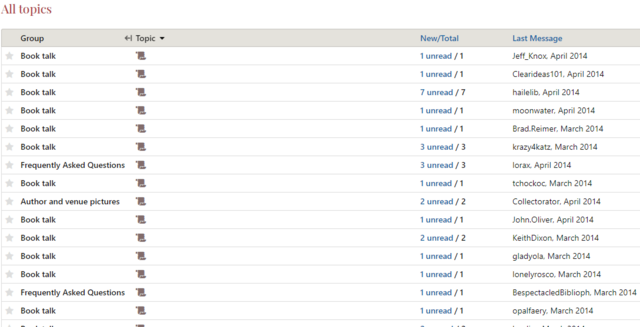
I'm using a laptop, Windows 8.1, Chrome browser. I can change the sort again by clicking on 'Last Message' or whatever, but I'm assuming the blank topic titles are a bug?
I'm using a laptop, Windows 8.1, Chrome browser. I can change the sort again by clicking on 'Last Message' or whatever, but I'm assuming the blank topic titles are a bug?
162anglemark
Is the bug reported in >145 anglemark: and >147 birder4106: really that hard to correct?
163norabelle414
>161 Heather19: Those have always been there, they showed up in the old style too if you sorted by topic name.
164humouress
>81 aspirit: Seconded. The pop-up box doesn't disappear so you don't know that the link has been saved until you close it by clicking the X and then refreshing the series page.
>86 goobergunch: Seconded. Although I can see the double headed arrow, when I try to drag, it just highlights instead.
>158 lorax: >160 NinieB: Ooh; maybe this is related to my sorting issue? https://www.librarything.com/topic/325419#7296857
Safari/ mac desktop
>86 goobergunch: Seconded. Although I can see the double headed arrow, when I try to drag, it just highlights instead.
>158 lorax: >160 NinieB: Ooh; maybe this is related to my sorting issue? https://www.librarything.com/topic/325419#7296857
Safari/ mac desktop
165lorax
humouress (#164):
I think you maybe made a cut/paste error? The thread you link to is about catalog sorting, not Talk sorting.
I think you maybe made a cut/paste error? The thread you link to is about catalog sorting, not Talk sorting.
166gilroy
Spam is showing even with a user removed from the system:
https://www.librarything.com/topic/144601#6106092
https://www.librarything.com/topic/144601#6106092
168gilroy
>167 lilithcat: The user had been removed. It shouldn't have needed the flag.
ETA: see the post immediately after mine as proof.
ETA: see the post immediately after mine as proof.
170ForeignCircus
I'm getting a touchstone error - none are showing in one in one of my posts in my 75 Reading Challenge. Not sure if it is related to the new interface or just a regular bug? (Post in question here)
171lilithcat
>170 ForeignCircus:
This seems to be happening a lot when folks edit long lists of touchstones. See https://www.librarything.com/topic/325538
This seems to be happening a lot when folks edit long lists of touchstones. See https://www.librarything.com/topic/325538
172ForeignCircus
>171 lilithcat: thanks lillithcat - I'll just keep trying!
173aspirit
>171 lilithcat: please note that this isn't happening with long lists now. Editing a post with a single touchstone can break the link, whether or not the touchstone is edited.
174Cynfelyn
The message "Information from the "language-name" Common Knowledge. Edit to localize it to your language" has disappeared from the work page.
When you added or edited a work's "Original publication date", it used to be localised in the language you were using. See for example Comet in Moominland, where the English, Finnish and Swedish original publication dates are appropriately different. Now it works more like an author's gender, carrying over between languages as solid content rather than something to be localised, although pre-existing language-specific content does seem to be being preserved.
So it used to be possible to say, as in Comet in Moominland, 1946 on the Swedish-language page; 1946 (Swedish), 1951 (English) on separate lines on the English page; and 1946 (alkuteos), 1955 (suomennos) on the Finnish page. This does not now seem to be possible.
Is this a bug, or an intentional change for LT 2.0?
When you added or edited a work's "Original publication date", it used to be localised in the language you were using. See for example Comet in Moominland, where the English, Finnish and Swedish original publication dates are appropriately different. Now it works more like an author's gender, carrying over between languages as solid content rather than something to be localised, although pre-existing language-specific content does seem to be being preserved.
So it used to be possible to say, as in Comet in Moominland, 1946 on the Swedish-language page; 1946 (Swedish), 1951 (English) on separate lines on the English page; and 1946 (alkuteos), 1955 (suomennos) on the Finnish page. This does not now seem to be possible.
Is this a bug, or an intentional change for LT 2.0?
175gabriel
Touchstones that work in individual posts aren't always showing up in the touchstones section in the right-hand bar. This seems to be a different problem than others were discussing.
https://www.librarything.com/topic/325904
https://www.librarything.com/topic/325904
176kristilabrie
>175 gabriel: Is that just Touchstones for series or Touchstones for authors/works? I'm only seeing series Touchstones in the thread you mention, so want to be sure of any other examples you're referring to.
ETA: okay, it seems series are just missing. Will add to our bugs.
ETA: okay, it seems series are just missing. Will add to our bugs.
179humouress
>177 kristilabrie: I'm seeing both titles in blue but only the book touchstone appears in the right-hand bar, if that helps.
180gilroy
I don't believe series has been added to the right hand box. Only Book and Author so far...
I did make this note on https://www.librarything.com/topic/324454#7290614 And Tim listed it as a good idea here: https://www.librarything.com/topic/324454#7290877
I did make this note on https://www.librarything.com/topic/324454#7290614 And Tim listed it as a good idea here: https://www.librarything.com/topic/324454#7290877
181elenchus
I didn't find a previous post on this
In Zeitgeist > Reviews, the thumbs no longer show green for reviews that I myself have already "thumbed". I can, however, toggle back and forth (decrementing / incrementing the counter beside the thumb) to see if I had thumbed or not when previously reading the review in my Home module.
Windows 8 / Chrome
In Zeitgeist > Reviews, the thumbs no longer show green for reviews that I myself have already "thumbed". I can, however, toggle back and forth (decrementing / incrementing the counter beside the thumb) to see if I had thumbed or not when previously reading the review in my Home module.
Windows 8 / Chrome
182konallis
Just discovered that now the Talk pages have switched to the new design, I can no longer reply to a post using my phone browser (Opera Mini for BlackBerry).
183kristilabrie
>181 elenchus: Good catch! I'll check with @conceptDawg to see if that was intentional (I'd assume there should be some visual indicator of voting/un-voting) or not. Thanks.
184kristilabrie
>182 konallis: Can you clarify what does or doesn't happen for you? Normally, hitting the "Reply" button on a post would show a text box with the post number auto-referenced. What happens for you now?
185gabriel
The edit history of Series pages doesn't seem to be tracking label changes anymore (at least Publisher Series, which is what I was working on). I'm pretty sure it was a week or two ago.
Oddly, seems to be still tracking this on the Global series edit history.
Oddly, seems to be still tracking this on the Global series edit history.
186lorax
kristilabrie (#184):
Four years ago a bug about that same browser/OS combo (Opera Mini on Blackberry), opened by the same poster, was closed by conceptDawg with the following comment:
About a year ago, Tim said, again in response to the same poster:
In fact, the only time "Opera Mini for Blackberry" shows up on Talk are bugs opened by konallis, or staff commenting on how they aren't going to spend much time fixing them.
Four years ago a bug about that same browser/OS combo (Opera Mini on Blackberry), opened by the same poster, was closed by conceptDawg with the following comment:
The facts of life are that it's not worth our very limited development time to work on fixes for native Blackberry devices. They are a dead-end, quickly disappearing from the world.
About a year ago, Tim said, again in response to the same poster:
It's going to be really hard to support systems with as few users as Opera Mini for BlackBerry.
In fact, the only time "Opera Mini for Blackberry" shows up on Talk are bugs opened by konallis, or staff commenting on how they aren't going to spend much time fixing them.
188Opteryx
>186 lorax: I was curious how long ago the Blackberry release was last updated... Looks like Opera Mini is still actively maintained on Android, currently in 50.x version from earlier in 2020; but on Blackberry, it is frozen in time, 8.x version from mid-2014.
189humouress
>81 aspirit: Still having the issue with adding/ editing links.
190humouress
I can't edit a post without losing touchstones. I've made a note in the bug collectors' group: https://www.librarything.com/topic/325538#7316250
191humouress
>189 humouress: Related issue?:
The 'Sort Groups' page in the new series doesn't seem to be working. I am unable to edit group names there; when I save, it returns me to the series page but without the changes I made.I am still unable to move the groups by dragging and dropping.
Safari, mac OS Big Sur
My mistake: I am able to drag and drop. However, the first group (and only the first) has a padlock icon on it and cannot be moved. If I add a group, that becomes locked at the top but all other groups can be moved. I'm editing the Tortall Universe series page.
The 'Sort Groups' page in the new series doesn't seem to be working. I am unable to edit group names there; when I save, it returns me to the series page but without the changes I made.
Safari, mac OS Big Sur
My mistake: I am able to drag and drop. However, the first group (and only the first) has a padlock icon on it and cannot be moved. If I add a group, that becomes locked at the top but all other groups can be moved. I'm editing the Tortall Universe series page.
192Cynfelyn
>174 Cynfelyn: Bump.
That is, CK "Original publication date" appears to have stopped being localizable, which is a problem for works that have been translated. Unedited localised 1.0 content appears to be being preserved at the moment. Is this a bug, or intentional LT 2.0?
That is, CK "Original publication date" appears to have stopped being localizable, which is a problem for works that have been translated. Unedited localised 1.0 content appears to be being preserved at the moment. Is this a bug, or intentional LT 2.0?
194al.vick
I have noticed that the padlock appears on the first group if there is no group labeled "core". If you make some work "core" you can reorder everything else, and then reassign that work that you made "core" to whatever group it really belongs to. Horrible kluge. But there are some series like "universes" where you don't want to have a "core". Anyway, that is what I have experienced for what it is worth.
195rocketjk
>190 humouress: "I can't edit a post without losing touchstones."
This is still happening for me. Extremely frustrating.
This is still happening for me. Extremely frustrating.
196jjmcgaffey
Interesting - I'm having no problem (went and tested just now). Firefox on Windows 10. When I click Edit, the Touchstones list on the side populates almost immediately. It does reset to the first search result, but it's always done that - for those books that needed (others) the first time, they'll need it every time the post is edited as well.
197humouress
>195 rocketjk: Yes, still happening. There is a separate bug report for touchstones; one remedy suggested there is to edit something else (ie not a touchstone) within the post which will sometimes bring the touchstones back.
198rocketjk
>197 humouress: But that's when I have the problem. If I create a post with a touchstone and then notice, say, a typo. I reopen the post to fix the typo and the touchstone disappears. Sometimes if I go back to the post later the touchstone returns. Maybe I'm misunderstanding what you mean, though.
199humouress
>198 rocketjk: Yes, the first edit loses the touchstones. But after that if you edit something it may bring them back.
ETA: this is the link: https://www.librarything.com/topic/325538#7323817
ETA: this is the link: https://www.librarything.com/topic/325538#7323817
200rocketjk
>199 humouress: Thanks! I will check out that link.
201gabriel
>194 al.vick:
I've had the same problem. It's a bit of a kludge fixing it, but the problem affects such a small proportion of series pages that I'd imagine it's a low priority.
I've had the same problem. It's a bit of a kludge fixing it, but the problem affects such a small proportion of series pages that I'd imagine it's a low priority.
202Helenliz
Can the order of the items in "Your World" be the same, or at least in the same order, on the website and the mobile version?
Website order:
Groups & Posts
Your Groups
Your Posts
Started by You
Groups You Admin
Starred Topics
Ignored Topics
Favourited Messages
Mobile order:
Groups & Posts
Your Groups
Your Posts
Starred
Started by You
If Starred Topics on thw website moved to before Started by You, the two would be consistent.
Website order:
Groups & Posts
Your Groups
Your Posts
Started by You
Groups You Admin
Starred Topics
Ignored Topics
Favourited Messages
Mobile order:
Groups & Posts
Your Groups
Your Posts
Starred
Started by You
If Starred Topics on thw website moved to before Started by You, the two would be consistent.
203fuzzi
>202 Helenliz: I'd love to be able to sort and organize those items, but I suppose that would be too much to hope for...

