
Catalog bugs: My plate is free. Load it up?
Talk Recommend Site Improvements
Join LibraryThing to post.
This topic is currently marked as "dormant"—the last message is more than 90 days old. You can revive it by posting a reply.
1timspalding
Anyone got open catalog bugs? I think we're totally clear. Here's Chris and my current list, in interactive Etherpad format:
http://etherpad.com/TMLWRW2RSs
Please, this is only catalog bugs—"Your books" bugs, to be precise. Returns in reviews don't count. French names for features don't count. Etc.
If you don't want to contribute bugs, come to Etherpad and collaboratively write some Haiku. ;)
http://etherpad.com/TMLWRW2RSs
Please, this is only catalog bugs—"Your books" bugs, to be precise. Returns in reviews don't count. French names for features don't count. Etc.
If you don't want to contribute bugs, come to Etherpad and collaboratively write some Haiku. ;)
2koffieyahoo
Reported these small ones before and don't think they were fixed yet (at least not yesterday):
* FF2/Linux: If I go to someone else's catalog (not my own) the sort button is not properly aligned, it's moved upwards.
* IE6/XP: the sort pull down menu is much wider than the text in the menu.
There were some other smaller visual bugs I reported, but I don't know how far you want to go in making it looking visually perfect in IE6 and FF2.
* FF2/Linux: If I go to someone else's catalog (not my own) the sort button is not properly aligned, it's moved upwards.
* IE6/XP: the sort pull down menu is much wider than the text in the menu.
There were some other smaller visual bugs I reported, but I don't know how far you want to go in making it looking visually perfect in IE6 and FF2.
3timspalding
Thanks.
I put the FF2 stuff under "punting," for now. FF2 is now 2.41% of our visits, and 1.61% of our member visits.
I'm going to avoid the IE6 bug for another 30 minutes, hoping something easier to test comes up. It's a fine summer day. I don't want to turn on the PC. ;)
I put the FF2 stuff under "punting," for now. FF2 is now 2.41% of our visits, and 1.61% of our member visits.
I'm going to avoid the IE6 bug for another 30 minutes, hoping something easier to test comes up. It's a fine summer day. I don't want to turn on the PC. ;)
4kevmalone
Another cosmetic one
FF3.0.9/XP the Search box is higher than the Search buttons. At one point it was bigger too, now it's just misaligned
(Note that the search box on the Home Page got the same type of issues when Catalogs were introduced - first bigger, now just misaligned.)
ETA: Fine summer day? Then please don't worry about the one I mention.
FF3.0.9/XP the Search box is higher than the Search buttons. At one point it was bigger too, now it's just misaligned
(Note that the search box on the Home Page got the same type of issues when Catalogs were introduced - first bigger, now just misaligned.)
ETA: Fine summer day? Then please don't worry about the one I mention.
5Nicole_VanK
Very minor point:
While all the buttons are centered, the words "Search your library" are aligned top-left.
FF3/XP
(Oops, same as kevmalone)
While all the buttons are centered, the words "Search your library" are aligned top-left.
FF3/XP
(Oops, same as kevmalone)
6koffieyahoo
3> don't care much about more subtle visual bugs in FF2, but the sort button thingy is weird because it is properly aligned in my own catalog.
Just curious: what's the current browser distribution?
Anyway: go enjoy the nice weather! Think you deserved some time in the sun after the catalog hell.
Just curious: what's the current browser distribution?
Anyway: go enjoy the nice weather! Think you deserved some time in the sun after the catalog hell.
7BTRIPP
Re. #1: ""Your books" bugs, to be precise"
I suspect you might be working on my current "pet peeve" of not being able to tell the difference between the "no reviews" and "you've reviewed" talk balloons ... as currently the latter are gone when a few hours back I was having to use the browser's "zoom" feature to see if those were yellow or not ... I'm hoping that you're going back to green for that (well the green/yellow/blank code for "you've reviewed this"/"somebody other than you reviewed this"/"nobody's reviewed this")!
I suspect you might be working on my current "pet peeve" of not being able to tell the difference between the "no reviews" and "you've reviewed" talk balloons ... as currently the latter are gone when a few hours back I was having to use the browser's "zoom" feature to see if those were yellow or not ... I'm hoping that you're going back to green for that (well the green/yellow/blank code for "you've reviewed this"/"somebody other than you reviewed this"/"nobody's reviewed this")!
8235711
7: I noticed that change as well. The "you've reviewed" balloons aren't yellow anymore but the same darker blue as the "users" icon (which reminds me of a chess pawn). Both now look very quiet.
9leahbird
like 7, my review balloons are gone, but only for books I'VE actually reviewed.
eta: ff3/vista
eta: ff3/vista
10timspalding
Click on this image and reload a few times:
http://www.librarything.com/pics/c.png
http://www.librarything.com/pics/c.png
12timspalding
That's like an advertising campaign for free speech.
Personally, I find the yellow/green distinction weird. There's a number next to it now. You don't need the color to tell you there are reviews.
Personally, I find the yellow/green distinction weird. There's a number next to it now. You don't need the color to tell you there are reviews.
14timspalding
It's blue now.
15BTRIPP
I like it less than the blank/yellow/green scheme, but at least I can see which books I've reviewed!
16timspalding
I love your icons, particularly big.
18klarusu
Does this include oddities in the 'Organise' section? If so, when I resize the tags text there's a spacing oddity, don't know if it's intentional. If I select 'size: large' or 'size: small', there is very little vertical space between each tag. If I select 'size: medium', there's a significantly larger space between each tag vertically. Seems a bit odd ...
Most up-to-date FF
Most up-to-date FF
19BTRIPP
Re. #16: "I love your icons"
Actually, those are YOUR icons (well, with the green version added), just at 1600% ... I cut-and-pasted from that page of icons you posted a link to, above.
Actually, those are YOUR icons (well, with the green version added), just at 1600% ... I cut-and-pasted from that page of icons you posted a link to, above.
20klarusu
Also, possibly not a bug but intentional ... when you are in organise view and you refresh it, it takes you back to library view.
Edited to add example of why I needed to refresh:
Accidentally hit back button from organise to my library view after editing tags, hit forward button and the edits didn't show up so I refreshed and it took me to library view. When I used organise button to refresh, edits showed.
It's probably not a bug but it is counter-intuitive. If I'm on a page and I hit refresh, I expect that page to refresh...
Edited to add example of why I needed to refresh:
Accidentally hit back button from organise to my library view after editing tags, hit forward button and the edits didn't show up so I refreshed and it took me to library view. When I used organise button to refresh, edits showed.
It's probably not a bug but it is counter-intuitive. If I'm on a page and I hit refresh, I expect that page to refresh...
21bookel
What one of the other programmers thought might be a catalogue bug (I don't know why, I am not a programmer!):
Text typed in the search box on Home page is too pale (freaking difficult to read!) and it is a smaller font besides, and aligned top left (intentional or not?). Can someone please, please look at it, and fix it back to ordinary dark black text (like what you type in these post a message fields). Thank you, much appreciated.
Text typed in the search box on Home page is too pale (freaking difficult to read!) and it is a smaller font besides, and aligned top left (intentional or not?). Can someone please, please look at it, and fix it back to ordinary dark black text (like what you type in these post a message fields). Thank you, much appreciated.
22timspalding
>20 klarusu:
Yeah. It depends on your browser, but refresh refreshes the URL at the top of the page, not the frame. It's not idea, I agree.
>21 bookel:
Should be changed.
However, goodnight people!
Yeah. It depends on your browser, but refresh refreshes the URL at the top of the page, not the frame. It's not idea, I agree.
>21 bookel:
Should be changed.
However, goodnight people!
23Lman
>22 timspalding: Tim - still no change for me with this - grey, v. small and aligned left top: FF3/XP.
However, sleep tight; don't let the bed bugs bite! (Apparently that expression has much greater connotations - there is a world-wide bed-bug epidemic. I kid you not...)
added the number to FF *sigh*
However, sleep tight; don't let the bed bugs bite! (Apparently that expression has much greater connotations - there is a world-wide bed-bug epidemic. I kid you not...)
added the number to FF *sigh*
27Heather19
I was just about to post my "bug", but I see 18 beat me to it. It's definitely strange to see a lot of vertical space only on "medium" size (which I think looks better, but whatever) and not the others.
28FicusFan
Prefer the green or yellow for the color of the review bubble. The blue is so faint, and very close to the empty bubble. You can see it if you look hard, but can't really just glance at it and tell. Having to study something so minor is not a good use of time.
30Heather19
*makes sure all guns/weapons are safely locked away*
I have to agree though. The blue is not obvious on first glance, and if my eyes were any worse I doubt I'd be able to tell the difference at all.
I have to agree though. The blue is not obvious on first glance, and if my eyes were any worse I doubt I'd be able to tell the difference at all.
31FicusFan
# 29, Sorry. I know you have been working very hard, and round the clock to make it better for us.
I think the problem is that we (users) and you have different goals. Users (if I may be so bold as to speak for the group) generally want quick strong visibility. It seems your goal is more aesthetic (which isn't bad in and of itself, except here it seems to interfere with usability ) and that seems to lead to blending in.
Of course I know some have complained about garish colors.
32PhaedraB
I haven't weighed in on this one (at least not that I remember) but FWIW, I can see a difference in the balloon where I contributed a review, but the rest of them all look the same. FF3, OSX 10.5
There is a difference in perception, the way the brain processes the search, when you scan for a color and when you scan for "a number that is not zero."
We're not insane, Tim, nor do we wish you to become so. Really.
There is a difference in perception, the way the brain processes the search, when you scan for a color and when you scan for "a number that is not zero."
We're not insane, Tim, nor do we wish you to become so. Really.
34reconditereader
I agree with both 30 and 31. Thanks for your patience.
35klarusu
Cover view in my catalogue on 'Covers' view:

Covers show fine in list view and on work page.

Covers show fine in list view and on work page.
36timspalding
I can't read that. Can you paste a little?
37klarusu
Sorry, I'm useless with screenshots. I tried to go back and replicate and now there's no message but the two covers are still blank. Here's the link to the screenshot on flickr, you should be able to make it large there and read the message:
http://www.flickr.com/photos/34060008@N07/3478813619/
http://www.flickr.com/photos/34060008@N07/3478813619/
38ryn_books
There's so many threads I'm not sure if this is already posted.
I can't edit any of my A-E styles in my catalogue. Clicking on the little symbol just refreshes the page.
It's been that way yesterday and today.
Using FF3.0.9 on WinXP
Oddly, at work using IE, I can edit these styles, so it's just an FF bug.
I can't edit any of my A-E styles in my catalogue. Clicking on the little symbol just refreshes the page.
It's been that way yesterday and today.
Using FF3.0.9 on WinXP
Oddly, at work using IE, I can edit these styles, so it's just an FF bug.
40bluesalamanders
There is something wrong with the buttons when I view my library (I mean, my books) on IE7/XP. I am more than willing to believe it's something wrong with my computer settings somewhere, but I have no idea what it could be. I cleared cache and history and everything and it didn't help. It shows up fine on FF and Opera.
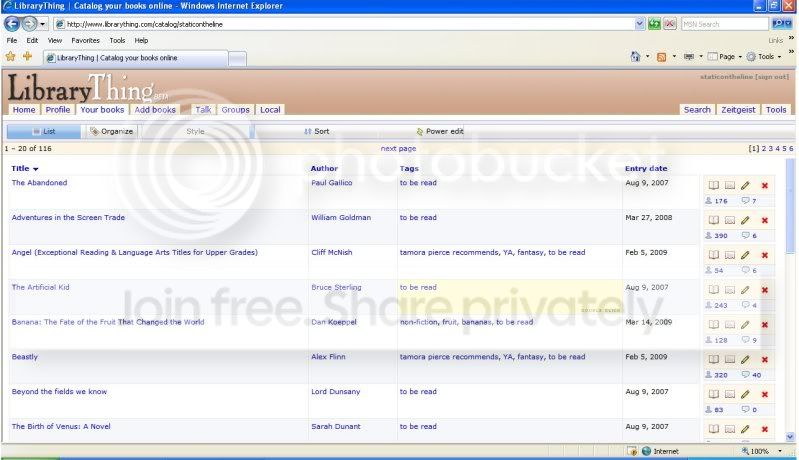
41conceptDawg
I've just tested my IE7/XP again to make sure and it doesn't look anything like your screenshot. Your buttons widths are blown out. I can't be sure of exactly what is causing it. Do you happen to know what build version of IE7 you are running? If you go tot he Help menu and select About IE you'll see it in the dialog box that pops up. For instance, mine is 7.0.5075 and change.
Also, do you happen to know if you are behind a proxy server (if you are in Australia then you very well might be). It is *possible* that you hit the page in FF first and are getting the FF-centric styles because of a proxy cache.
Also, do you happen to know if you are behind a proxy server (if you are in Australia then you very well might be). It is *possible* that you hit the page in FF first and are getting the FF-centric styles because of a proxy cache.
42conceptDawg
38: Is it fixed for you now?
43bluesalamanders
41 cD - It says 7.0.5346.5 and this isn't something that started today, I only just had a chance to post the screenshot. It's been doing it as far as I recall since these most recent changes happened, the new buttons etc.
I don't use IE often but I haven't seen anything weird on any other sites. As far as I know I'm not behind a proxy, although I'm not sure what that is. Also, I'm in the US.
I don't use IE often but I haven't seen anything weird on any other sites. As far as I know I'm not behind a proxy, although I'm not sure what that is. Also, I'm in the US.
44Foretopman
>38 ryn_books:: This is sometimes happening to me, also (the 'edit styles' button doesn't work). It only seems to happen right after I've edited styles (but not every time) and the problem seems to go away if I switch to a different style.
FF 3.0.3 / WinXP
FF 3.0.3 / WinXP
45leahbird
just noticed that if i go to search tab, search for something, then backpage back to the search tab, i can't search the same box again.
for ex: i search for "satire" under tags. got results. backpaged. now i can enter another tag search but the search button is grey and i can't click on it.
ff3/vista
for ex: i search for "satire" under tags. got results. backpaged. now i can enter another tag search but the search button is grey and i can't click on it.
ff3/vista
46kevmalone
>45 leahbird: I saw that a couple of times recently. It's not something I do a lot of so had not tied it to the catalog release.
FF3.0.9/XP
ETA spelling
FF3.0.9/XP
ETA spelling
47conceptDawg
45: That's in the site-wide search, though. Correct?
It's a known problem but we're in the process of upgrading the search page/mechanism so it hasn't been addressed. But if I get time.... :)
At any rate, it's unrelated to the catalog upgrade.
It's a known problem but we're in the process of upgrading the search page/mechanism so it hasn't been addressed. But if I get time.... :)
At any rate, it's unrelated to the catalog upgrade.
49leahbird
>47 conceptDawg:
yeah, in the site wide search. i never really used it much before so i didn't know if that was new or not. i'm not overly bothered by it, but wanted to be on the safe side and give you a heads up.
yeah, in the site wide search. i never really used it much before so i didn't know if that was new or not. i'm not overly bothered by it, but wanted to be on the safe side and give you a heads up.
50bookel
45 atlargeinthewrld - I have seen that search page button going grey thing for a long, long time, way way before the new catalogue came into effect. You need to reclick the Search page button in order to get it to work again... hopefully it will be fixed eventually as said above.
51vstopple
I'm having a problem searching my library (my books).
Starting yesterday (Sun 4/26), I haven't been able to search my books. Up to then, I've always been able to enter, for instance, the author name, choose author/title and click search and get a list of all the titles for a given author.
Now, for almost all authors I've tested, I get no titles, but I know I have several titles by that author.
I've been looking for somewhere to post this problem problem, but I haven't been able to find where if anywhere.
The funny thing is, for one author, it returns one title (although there are actually 4 or more) and this is a title I just added the morning of 4/26.
Starting yesterday (Sun 4/26), I haven't been able to search my books. Up to then, I've always been able to enter, for instance, the author name, choose author/title and click search and get a list of all the titles for a given author.
Now, for almost all authors I've tested, I get no titles, but I know I have several titles by that author.
I've been looking for somewhere to post this problem problem, but I haven't been able to find where if anywhere.
The funny thing is, for one author, it returns one title (although there are actually 4 or more) and this is a title I just added the morning of 4/26.
52conceptDawg
Please do not reindex vstopple's catalog!!!!
I want to check it out before somebody reindexes it. I'll reindex after I look at it.
Thanks.
I want to check it out before somebody reindexes it. I'll reindex after I look at it.
Thanks.
53bookel
25 - Tim / conceptDawg (whoever did it, grin) thanks for fixing the Home page search box text, it is SO much better!!! :)
54conceptDawg
53: You're welcome. :)
52: Vstopple's catalog is now current.
52: Vstopple's catalog is now current.
55ryn_books
at cD in message 42.
Yep, whatever you did is all good and I can now edit my styles in FF.
Yay!
Thanks heaps for all the great work you've all been doing.
Yep, whatever you did is all good and I can now edit my styles in FF.
Yay!
Thanks heaps for all the great work you've all been doing.
56FicusFan
Help !
The top of my catalog is all wonky. It looks like it did shortly after the new catalog came in.
It was OK yesterday afternoon. I wasn't on last night, and this morning its all mixed up.
FF2.X XP

You may need to click to make the picture larger.
The top of my catalog is all wonky. It looks like it did shortly after the new catalog came in.
It was OK yesterday afternoon. I wasn't on last night, and this morning its all mixed up.
FF2.X XP
You may need to click to make the picture larger.
57jimroberts
#56: FicusFan
I came here to report the same thing, FF2 Linux. My books and others' books now have the totally screwed up power bars, which has been going on sporadically before but cleared up on reload, which now doesn't happen.
conceptDawg:
Is this going to get better again or do I have to bite the bullet and upgrade to FF3 at last?
I came here to report the same thing, FF2 Linux. My books and others' books now have the totally screwed up power bars, which has been going on sporadically before but cleared up on reload, which now doesn't happen.
conceptDawg:
Is this going to get better again or do I have to bite the bullet and upgrade to FF3 at last?
58justjim
Mine looked fine in FF3.0.10, but I cleared my cache and had another check and Ooohh, mini buttons!. I like it, but there's gonna be some who don't (goes without saying, I suppose).
59koffieyahoo
56, 57> Have the same problem (FF2/Linux).
60justjim
Hmmm, just noticed that the "Organise" button now says "Tags" but the tooltip says "Show tags and collections"! Be still my beating heart!
61bookel
Wow, there's actually a drop-down list next to the search box in 'my books', and it fits my screen!!! Well, the single arrow did, but not once I selected something, oh well. Is there an arrow after that? Because I could not change it back to the drop down arrow.
62FicusFan
I am at work now on Safari 2.X OSX, and it looks fine on this computer.
I did notice before I left home 2 things about my display on FF2.X XP
1. The sort button had gone. The tooltip was there if you moused over the space, but the button was gone.
2. If I went into tags/organize - the little tag icon in front of each tag was missing. (still here on Safari).
63vstopple
I just tried the search of 'my books' and IT WORKED! I'm curious, how did it get messed up?
I don't really need an answer unless there is something I should avoid so it doesn't happen again.
I don't really need an answer unless there is something I should avoid so it doesn't happen again.
64koffieyahoo
In IE6/XP the text on the sort, power edit, and print buttons is missing now.
See in the other thread this was on purpose. However, it wasn't done properly. If I hover over the buttons with my mouse I get the popup you get when looking at a picture.
See in the other thread this was on purpose. However, it wasn't done properly. If I hover over the buttons with my mouse I get the popup you get when looking at a picture.
66AnnaClaire
How about a non-catalog bug that's been going on since at least February, and hasn't even gotten a "we'll look into it"? (Three months without a single in-thread comment from The Staff? I mean really.)
Edited to add: As long as you say you mean to get to it once Collections are out, I'll shut up until they do. I'm just pissed that (for all I know) you haven't looked at that thread).
Edited to add: As long as you say you mean to get to it once Collections are out, I'll shut up until they do. I'm just pissed that (for all I know) you haven't looked at that thread).
67koffieyahoo
65> I'm not only getting the help text but also the save, print, email, ... image popup.
68MarthaJeanne
I don't go into my catalog a lot, but tonight I did, and then I changed the view, and the header went all wonky. It took up over half the screen, things were not at all recognizable, most things have only icons, but no labels, I can't see what the various columns are supposed to be. I can see about two records at a time. The catalog is basically useless like this.
69MarthaJeanne
I've signed out and back in a couple of times, and deleted my LT cookies, but this has stayed wonky.
FF2/Windows XP
FF2/Windows XP
70conceptDawg
vstopple:
Nothing you did. It was a system error that caused it.
Regarding FF2
We really didn't change anything that would have caused the complete hosing of the powerbar like that. All I did was remove the text from those buttons. Alas, FF2 has some serious rendering issues. If you can upgrade to FF3 then by all means you should. FF2 is now around 1% of our user base (and dropping). It's hard to justify spending 80% of our development time fixing bugs specific to it.
Martha:
What browser are you using again? Sorry, I can't keep up.
Anna:
And I still won't comment on it in this thread. Bump the other thread if you want us to look at it. Sometimes we just don't have time to handle it and then it rolls off the bottom of our list. bumping it (multiple times, if nec.) is ok with us.
Nothing you did. It was a system error that caused it.
Regarding FF2
We really didn't change anything that would have caused the complete hosing of the powerbar like that. All I did was remove the text from those buttons. Alas, FF2 has some serious rendering issues. If you can upgrade to FF3 then by all means you should. FF2 is now around 1% of our user base (and dropping). It's hard to justify spending 80% of our development time fixing bugs specific to it.
Martha:
What browser are you using again? Sorry, I can't keep up.
Anna:
And I still won't comment on it in this thread. Bump the other thread if you want us to look at it. Sometimes we just don't have time to handle it and then it rolls off the bottom of our list. bumping it (multiple times, if nec.) is ok with us.
71AnnaClaire
Bump the other thread if you want us to look at it. (#70)
I HAVE bumped it. Quite a few times. Others have too.
Edit: That thread has been duly re-bumped. And that's in addition to having posted a link to the thread in post 66 of this thread.
72conceptDawg
Yep, thanks.
Thread hijacking won't get it looked at any faster though. The bump is enough. Generally we work within one subset of the code at a time and if the bug is unrelated then cross-posting in another thread might actually be counter-productive because I may see the report, not be able to work on it, assume that somebody else got it, and it will be buried in the wrong thread and lost to obscurity.
Thread hijacking won't get it looked at any faster though. The bump is enough. Generally we work within one subset of the code at a time and if the bug is unrelated then cross-posting in another thread might actually be counter-productive because I may see the report, not be able to work on it, assume that somebody else got it, and it will be buried in the wrong thread and lost to obscurity.
73MarthaJeanne
I said FF2 XP. Looking back, yes, it looks like 56.
74conceptDawg
Is FF2 fixed for everybody?
75koffieyahoo
74> Can't check right now, but you did solve the IE6 issue I reported above.
Why did you remove the text on the buttons? Seems to reduce clarity.
Why did you remove the text on the buttons? Seems to reduce clarity.
76FicusFan
CD. I am still at work so I can't check my FF2 set up until I get home. I will let you know when I do. Thank you for asking.
I found this thread in Bugs, someone started one about a FF problem with the catalog. I guess he missed all the other threads. I don't know if you have seen the thread or not.
http://www.librarything.com/topic/63556
77FicusFan
#74 CD. I am home and my FF2 is fine except for 1 thing. The power bar is back to normal, but in
Tags( was Organize) the little Tag icons to the left of each of tag is still missing. No big deal, though I guess it will be important later.
Thanks for your help.
78twilightlost
In my 'Your Library', the tag button is back but nothing happens when I click it.
This is what shows up along the bottom of my screen if I hover over it:
www.librarything.com/catalog_tags.php?
I am using the most recent update of Firefox.
(Didn't this button say something else when you did the recent update to the site? Is it only changed back to saying 'tags' until collections are live?)
This is what shows up along the bottom of my screen if I hover over it:
www.librarything.com/catalog_tags.php?
I am using the most recent update of Firefox.
(Didn't this button say something else when you did the recent update to the site? Is it only changed back to saying 'tags' until collections are live?)
79MarthaJeanne
74>It looks fine when I open it, but I can't change views. (But if I reopen it, it opens in the last one I clicked on.)
Tags will open in a new tab, but if I just click on it, it does nothing. Same with power edit.
Tags will open in a new tab, but if I just click on it, it does nothing. Same with power edit.
80jimroberts
#74: conceptDawg "Is FF2 fixed for everybody?"
OK for me again now, thanks.
OK for me again now, thanks.
81jimroberts
#75: koffieyahoo "Why did you remove the text on the buttons? Seems to reduce clarity."
My guess is that's it's part of helping people with narrow screens.
My guess is that's it's part of helping people with narrow screens.
82koffieyahoo
81> Yeah, Tim said in another thread that they need more space for some buttons related to collections.
74> Fixed for me.
74> Fixed for me.
83conceptDawg
74: Sorry about that. It was me making a change to fix one thing and it broke another. Corrected now.
84MarthaJeanne
Seems to be working now.
86detailmuse
My row of YourBooks buttons is wonky this morning after I installed IE8 (with XP) last night. They're no longer buttons, though the fields are still clickable.
And there are no column titles to sort by in ListView (maybe these were already gone? I can't remember) but can still use the EditSortOrder box.
And the Tag view is cropped too tight at the top although the uppermost tags are still clickable.
(I just emailed a couple screenshots in a Word doc to Chris ... sorry,
don't know how to capture a screenshot into a jpg to post here.)
And there are no column titles to sort by in ListView (maybe these were already gone? I can't remember) but can still use the EditSortOrder box.
And the Tag view is cropped too tight at the top although the uppermost tags are still clickable.
(I just emailed a couple screenshots in a Word doc to Chris ... sorry,
don't know how to capture a screenshot into a jpg to post here.)
87detailmuse
re: 86 I just noticed a new button at the end of the address box in IE8, the tool tip says: “Compatibility View: Websites designed for older browsers will often look better, and problems such as out-of-place menus, images, or text will be corrected.”
I clicked it and everything in >86 detailmuse: looks good again. Clicked it again and the display issues are back. etc.
I clicked it and everything in >86 detailmuse: looks good again. Clicked it again and the display issues are back. etc.
88AnnaClaire
>72 conceptDawg:
You do at least see why I thought a threadjacking might have been called for though, right?
You do at least see why I thought a threadjacking might have been called for though, right?
89conceptDawg
87: Right. We are going to set it to automatically enter compatibility mode for LibraryThing. It's just one less browser engine to have to support until IE8 takes over. We'll code everything to IE7 (and make concessions for IE6).
90amysisson
Still driving me nuts that sorting is inconsistent in regards to chron and reverse chron. For "date entered", reverse chron is "down". For many other things (date read, date started), reverse chron is "up". Personally I would prefer that reverse chron be the default for most fields, whether you call it up or down.
91twilightlost
Just wanted to say that my problem that I mentioned in #78 seems to be fixed now - clicking on the tags button takes me to my tags screen.
92_Zoe_
>90 amysisson: I think date entered needs to change direction, and the directions need to be re-labelled as "default" and "reverse". Tim said in some other thread that he wasn't going to deal with sorting until... something I can't remember. Is it time yet? ;)
93rsterling
As someone posted here, when you're in someone else's catalog, the plus sign to "add to your library" doesn't seem to have the right hyperlink. It goes to the edit book page (i.e. it has the same hyperlink as the pencil does when you're in your own catalog), when it should go (right?) to the add books page to launch a search.
Sorry if this has been posted before, but I didn't find anything about it.
Sorry if this has been posted before, but I didn't find anything about it.
94rsterling
^Just bumping for this little bug (wrong URL on "add this book to your library" link), when looking at someone else's catalog.
95FicusFan
Bumping again too
Still no tag icon next to each tag under the tags tab. FF2.X XP
Still no spaces as of last night when review is edited or created by the Review link. Spaces are there, but not posted. problem for both FF2.x XP, and Safari 2.X OSX.
Still no tag icon next to each tag under the tags tab. FF2.X XP
Still no spaces as of last night when review is edited or created by the Review link. Spaces are there, but not posted. problem for both FF2.x XP, and Safari 2.X OSX.
97FicusFan
Thank you.
I peeked in again. Forgot to check before I posted. At least you seem not to be 'in hell' anymore.
I peeked in again. Forgot to check before I posted. At least you seem not to be 'in hell' anymore.
98conceptDawg
Just a different kind of Hell. But I feel like it's getting cooler down here.
100staffordcastle
Minor bugginess since the new catalog - didn't bother to post before, since it's such a tiny thing. On my tags page, the little tag icons in front of each tag have a grey box around them (IE6/WinXP) which is not very nice-looking, and is not there on my iMac (Safari/OSX 10.4).
101conceptDawg
This is actually a bug in the way that IE6 handles PNG files. There are workarounds but not with the way that we implement our icons. About the only thing that I can tell you is: upgrade....to Firefox. :)
103staffordcastle
I have done that at home, where I didn't have the problem with Safari anyway. I am one of those benighted souls who are stuck with IE6 at work until our IT department decides to upgrade to something else. And I would put money on it not being Firefox. :-(
104conceptDawg
Yeah, I figured that was the case. It was really more tongue in cheek than a real comment. I feel for you.
105timspalding
Is anyone still having problems with the tag button? What browser and OS are you, if you are having them?
Tim
Tim
106cyderry
Tim
What happened?????
My catalog is now displayng horizontally instead of veritically.
HELP!
What happened?????
My catalog is now displayng horizontally instead of veritically.
HELP!
107lorax
106>
See http://www.librarything.com/topic/64591
(As a side note, let me add that since I don't see this bug (I use FF) the "horizontal/vertical" or "landscape" descriptions confused me terribly until I saw a screenshot -- it's that all the books are crammed onto one line.)
See http://www.librarything.com/topic/64591
(As a side note, let me add that since I don't see this bug (I use FF) the "horizontal/vertical" or "landscape" descriptions confused me terribly until I saw a screenshot -- it's that all the books are crammed onto one line.)

